
You run on HubSpot. Your team works the top of the list, the hot ones, the people who replied.
The rest just sit there. Hundreds, maybe thousands of contacts who put their hand up once and went quiet.
A native AI voice agent for HubSpot calls that rest. It books the meeting on the call, assigns the right person, and writes the whole thing back to the contact record. No new dashboard, no CSV export, no dead ends.
What does a native HubSpot AI voice agent actually do?
The simple version: it reads and writes HubSpot directly.
The agent calls a contact, has a real conversation, and books a meeting. It logs the call, updates the record, and hands warm leads to a human. Everything lands where your team already works.
That is the whole point of native. The agent's work shows up inside HubSpot, not in some other tool you have to remember to go and check.
How does the AI book a meeting straight into HubSpot?
This is the part people do not believe until they watch it happen.
On the call, the agent checks real availability and offers a time. When the contact says yes, it books the slot there and then, mid conversation.
A round robin link assigns the meeting to the right person automatically, so it lands with whoever is next in the rotation. The invite fires, and the booking shows on the HubSpot calendar and the contact timeline. No back and forth email, no double bookings.
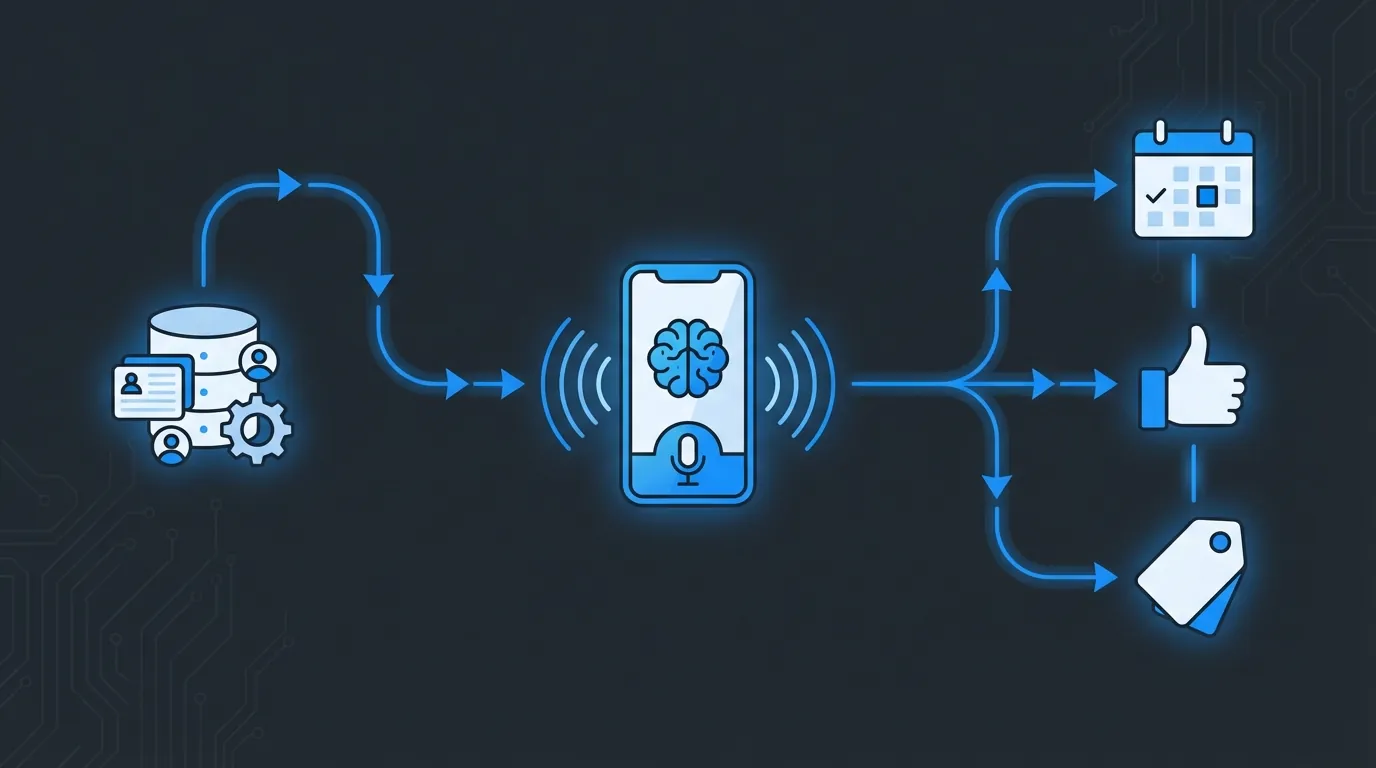
HubSpot triggers the call. The agent books and qualifies. Everything flows back to the record.
What is an evergreen campaign, and why keep it open?
Most outbound dies because it runs once and stops.
An evergreen campaign is tied to a HubSpot list and left running. Any new contact that enters the list auto-enrols and gets called on cadence.
So you build the list once. New enquiries, dormant tags, form fills, anything that drops into that list gets worked automatically. No weekly export, no re-uploading a spreadsheet every Monday.
We covered the outbound side of this in detail with an Auckland brokerage that worked 44,000 dormant HubSpot contacts and booked 42 meetings from a test of 800.
Does every call and text land on the HubSpot timeline?
Yes, and this is the bit that keeps everyone honest.
Every call, every SMS, every outcome writes to the contact timeline. Connected, booked, no answer, opted out, it is all there with a plain English summary and a link to the recording.
You read the whole story inside HubSpot. Nobody has to log into a separate platform to find out what the agent said or what the lead actually wanted.
Native app or a stack of connectors, why does it matter?
You can bolt an AI agent onto HubSpot with a chain of connectors. It works, right up until one link quietly breaks and you find out days later that nothing logged.
A native HubSpot app connects from the portal in a couple of clicks and keeps the moving parts in one place.
Fewer things to break, and one place to see at a glance that the sync is healthy. When you are trusting a machine to call your leads, you want to know it is still running.
What can an AI receptionist do inside HubSpot?
For inbound, the agent is your AI receptionist.
It answers the phone, takes a proper message, and books the appointment if the caller wants one. The contact gets created or updated, and the message and booking land on the timeline.
After-hours enquiries never hit a dead end. The call gets answered, the details get captured, and your team sees it first thing in the morning.
What can an AI sales agent do inside HubSpot?
For outbound, it is your AI sales agent.
It works a warm list, qualifies the contact, and books the call. Along the way it writes back the useful stuff, budget, timeline, the pain they mentioned, as contact properties.
On a hot lead it can create or associate a deal in the right pipeline and stage, so bookings flow into your closing process. If someone opts out, dialling stops and the do-not-contact property writes straight back.
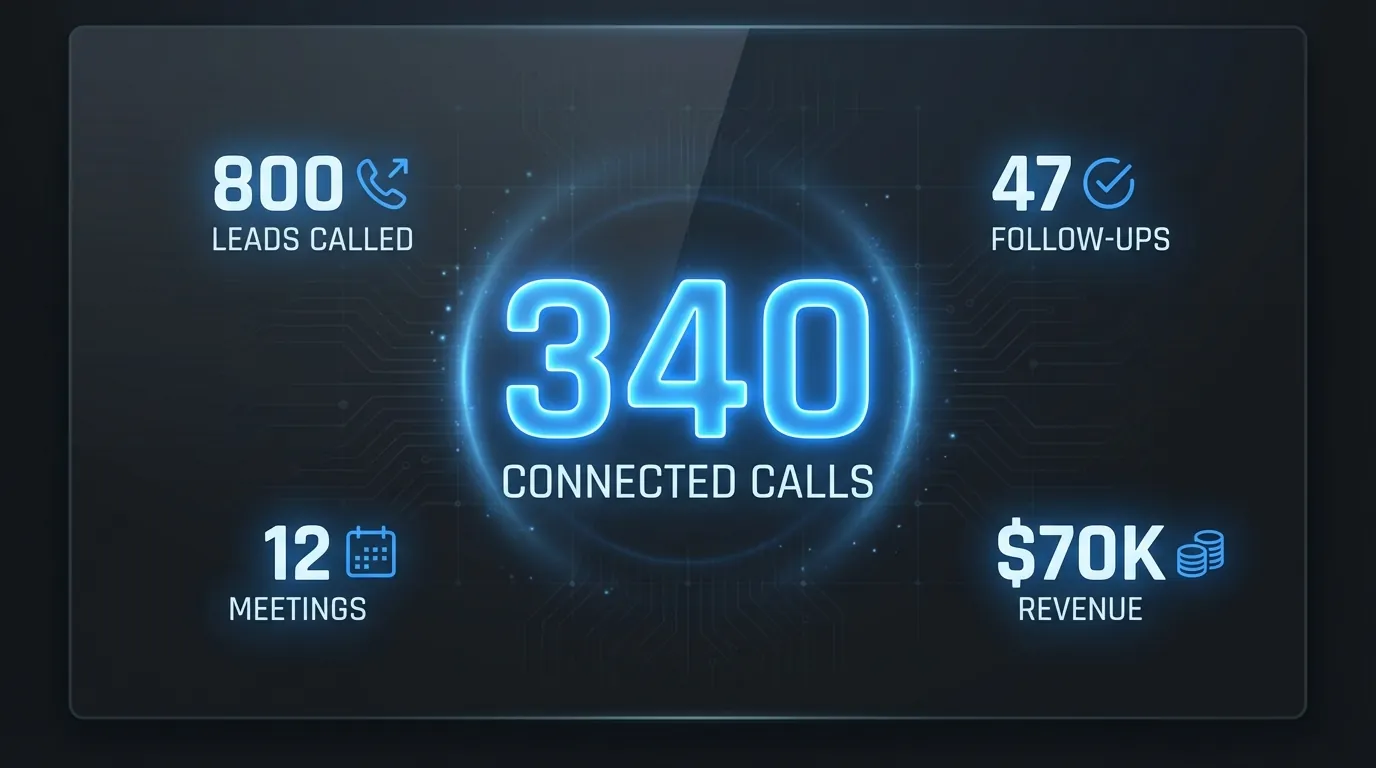
Enrolled, connected, booked, opted out. The scoreboard lives in HubSpot, not a separate tool.
We already run this. A Sydney agency pulled 141 vendor leads in 90 days off a warm list. Same mechanism, different list, all logged back to the CRM.
Frequently Asked Questions
Can an AI voice agent book meetings directly in HubSpot?
Yes. It books on the call against real availability, a round robin link assigns the right person, and the meeting shows on the HubSpot calendar and the contact timeline.
Does it log calls to the HubSpot timeline?
Every call, SMS and outcome writes to the contact timeline with an AI summary and a link to the recording, so the full history reads inside HubSpot.
Do I need Zapier or another connector?
No. It is a native HubSpot app connected from the portal in two clicks, which means fewer moving parts and one place to check the sync is healthy.
What is an evergreen campaign?
A campaign tied to a HubSpot list that stays open. New contacts that enter the list auto-enrol and get called on cadence, so the list keeps working without a weekly export.
Will it create a deal?
On a hot lead it can create or associate a deal in your chosen pipeline and stage, so booked meetings flow straight into your closing process.
What happens when someone opts out?
Dialling stops immediately and the do-not-contact property writes back to the HubSpot contact, so they are never called again.
See it on your own HubSpot
If your HubSpot is full of leads nobody has time to call, that is exactly the job this does.
Want the full function list, every trigger, write-back and timeline event? Read every function the HubSpot integration runs.
Take a look at Waboom AI voice agents and we will walk you through the HubSpot integration live, on your list, with your setters' calendars.
Leonardo Garcia-Curtis
Founder & CEO at Waboom AI. Building voice AI agents that convert.
Ready to Build Your AI Voice Agent?
Let's discuss how Waboom AI can help automate your customer conversations.
Book a Free Demo

