
44,000 contacts in a CRM. A handful actively worked. The rest sitting there like forgotten gym memberships. You already know the answer.
That’s one Auckland commercial brokerage’s HubSpot right now.
They picked 800 of those dormant leads for a test. Ran their first AI voice agent campaign on them. 340 connected calls, 95 tagged for broker follow-up, 42 meetings booked directly.
Seven became signed agency agreements worth $245,000 in combined fees, from leads nobody in your team would have called.
The Dead Pipeline Problem
Every business with a CRM has this problem, whether you’re a property brokerage, a SaaS company, or a trades firm.
Leads come in, your team works the hot ones, maybe follows up on the warm ones. Then the next batch arrives and the older contacts quietly rot in the pipeline.
You’ve seen it in your own CRM. (We all have. It’s the bit nobody wants to talk about because fixing it means making thousands of calls nobody has time for.)
A typical sales team actively works maybe 15% of their pipeline. The other 85% sits there collecting dust until someone finally deletes the list. In this case, that’s roughly 37,000 contacts nobody was ever going to call.
How the HubSpot Integration Works
Here’s what that Auckland brokerage built, and what you can replicate in about 40 minutes.
Step 1: The HubSpot Workflow
Any contact sitting in your pipeline for 90 days without activity gets tagged AI-Call in HubSpot. If last activity date is more than 90 days ago and status isn’t “Won” or “Lost”, apply the tag. You’ve probably built workflows like this before.
Step 2: Push to Waboom
Your HubSpot workflow fires an HTTP request to the Waboom API with the contact’s phone number and dynamic variables. Their name, the property they enquired about, the broker’s name.
No middleware required. HubSpot, Pipedrive, Salesforce, any CRM with native HTTP actions can call the API directly. If your team prefers a visual builder, it also works with Make.com, Zapier, or n8n.
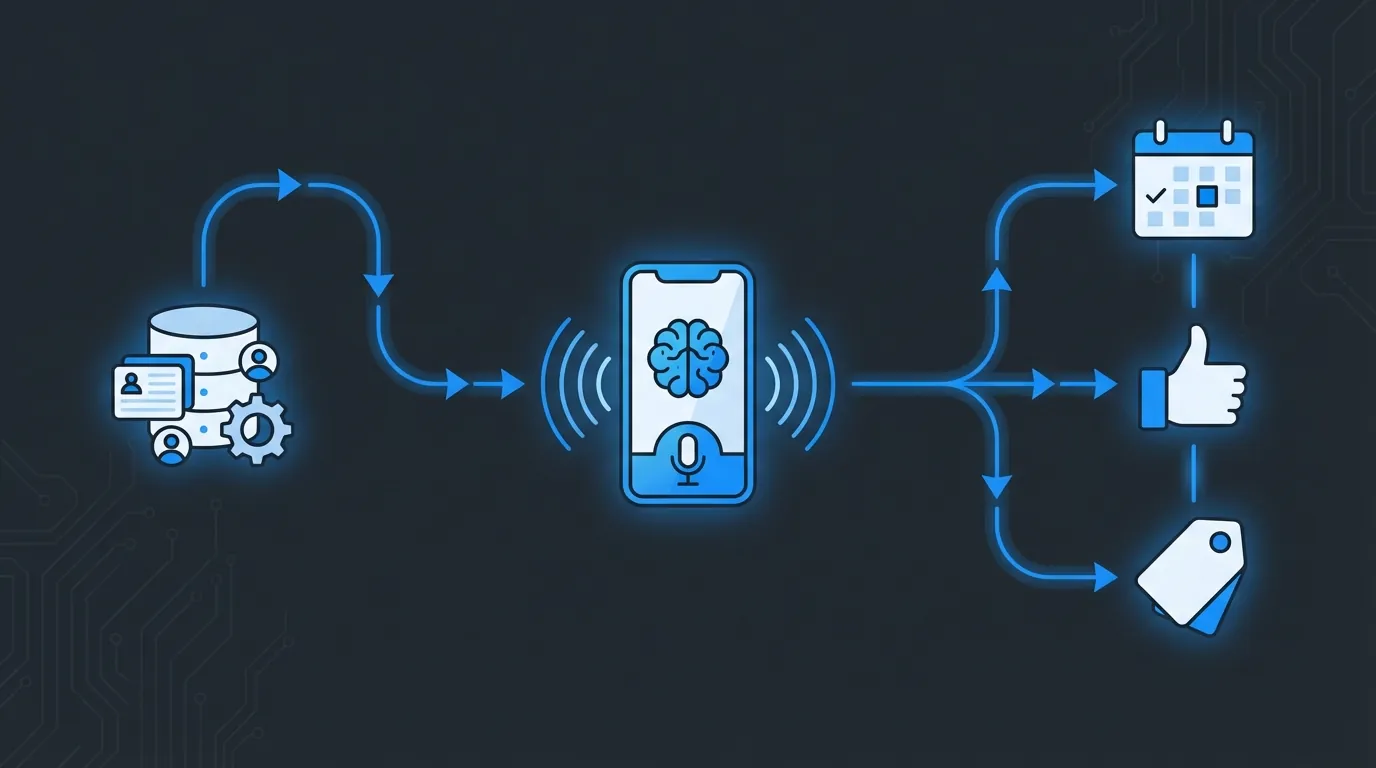
CRM triggers the call. AI makes it. Data flows back. Your team only talks to warm leads.
Step 3: The AI Voice Agent Calls
As contacts drip into the campaign each day (whenever they hit that 90 day mark), the voice agent starts calling. It paces calls with 80 to 120 second intervals, rotates phone numbers after 50 calls, and times outreach for optimal windows.
For B2B that means Tuesday to Thursday, 10am to midday and 2pm to 4pm.
The agent introduces itself and references the original enquiry. “Hi Sarah, I’m calling from Bayleys Commercial, you registered interest in the Parnell office space back in November.” Not a robocall script.
Step 4: The Data Flows Back
After every call, Waboom fires a call_analyzed webhook back to your CRM endpoint. That payload includes sentiment, a plain English call summary, whether the conversation hit its objective, and any variables the AI extracted.
Budget range, timeline, preferred location. Your CRM catches that webhook and routes accordingly.
Positive sentiment and still interested? Tag changes to Broker-Followup, task gets created for the assigned broker, and the call summary drops into their timeline.
Wants a meeting? The AI books directly into the broker’s Google Calendar or Outlook via Waboom’s calendar integration, and your CRM gets updated with the details.
Not interested? Tagged AI-Declined and added to the Do Not Call list via the DNC API. No answer? Retry logic tries again 24 to 48 hours later, up to 3 attempts per week with randomised timing.
That Auckland brokerage got 340 connected calls from 800 dormant leads. 95 tagged for broker follow-up, 42 meetings booked, seven signed agency agreements within three weeks.
$245,000 in fees from leads their team had written off. Want to see a property deployment in detail? Check the real estate case study.
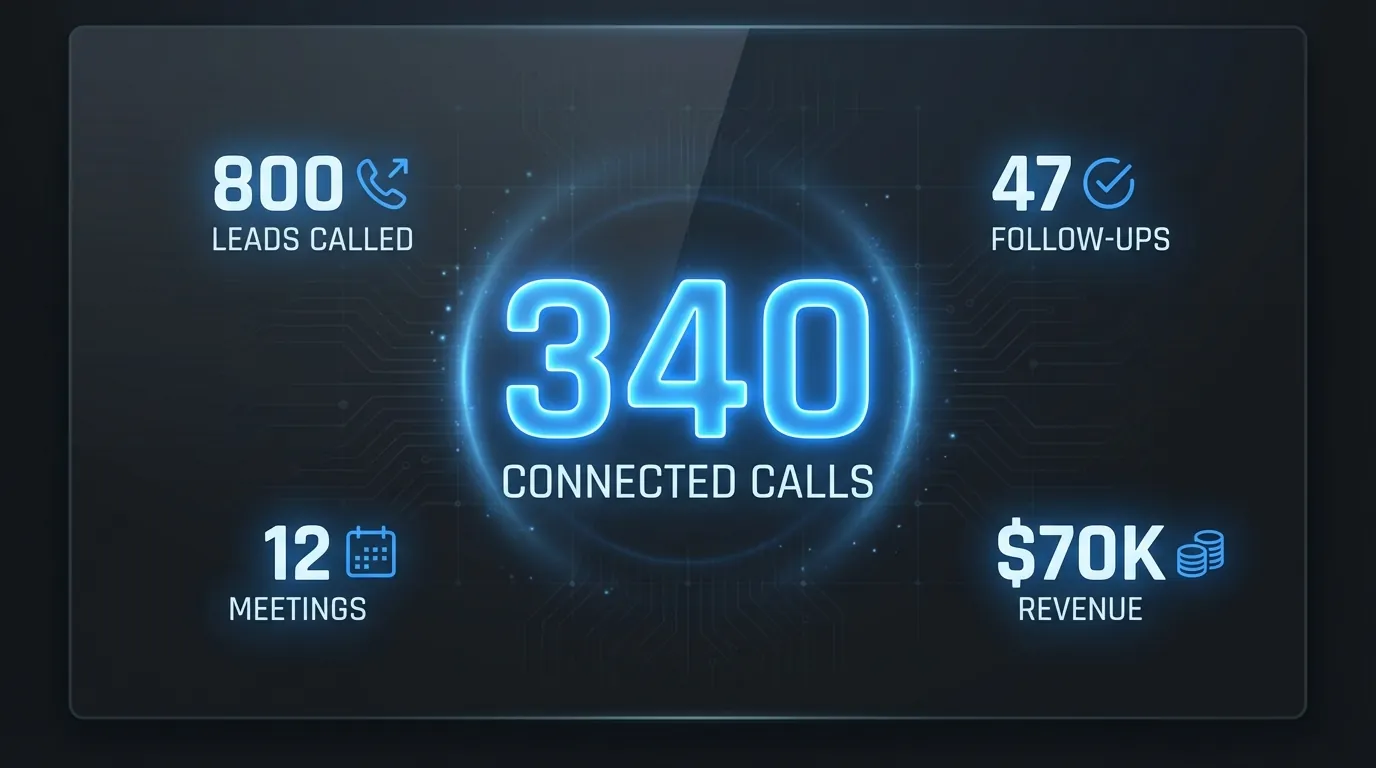
800 dormant leads. 340 connected. 42 meetings. Seven signed deals. Three weeks.
What You Can Pull From the Waboom API
Let’s get specific. If you’re connecting your CRM, here’s what’s available through the integration API.
Call Data
Every call your AI agent makes gets logged. Status, direction, duration in milliseconds (filter meaningful conversations from quick hangups), and sentiment analysis that’s post-processed to correct false negatives.
You also get a plain English call summary, voicemail detection, and full transcript for compliance. Your CRM receives structured data the agent captured: name, email, budget, timeline, preferences.
Cost breaks down by agent and telephony in cents, filterable by date range, agent, or status, paginated at 100 per request.
Campaign Data
Want to know how your campaign’s performing? Pull live KPIs: contacts loaded, calls made, calls connected, meetings booked, sentiment counts, connect rate, booking rate, and cost per booking.
Push Contacts
Send contacts from your CRM into an active campaign with dynamic variables so the AI personalises every call. Phone number plus whatever context you want: name, company, deal stage, last interaction date.
Do Not Call Management
Sync your DNC list both ways. Someone tells the AI agent they don’t want calls? Waboom auto-detects the phrase, adds them to the DNC list, and the webhook notifies your CRM.
You can also push numbers from your CRM to prevent calls before they happen.
Agent Management
List your agents and update their dynamic variables on the fly. Running a campaign for a new product launch? Push the details through the API and the AI updates its script instantly, no portal login required.
Usage and Billing
Track your spend across agents: total calls, minutes, costs, and connect rate. Useful if you’re managing multiple agents across different departments.
The Webhook Events That Drive Everything
Waboom pushes eight webhook events to your CRM. The three you’ll use most:
call_analyzed fires when AI analysis completes, pushing sentiment, summary, and extracted data straight into your CRM. campaign_completed tells you when the agent has called every contact. dnc_detected fires when someone asks not to be called again.The other five give you granular tracking if you want it: call_started, call_ended, campaign_started, campaign_paused, and contact_called.
Every webhook comes signed with HMAC-SHA256 so your CRM validates before processing. Secure, auditable, compliant.
Why This Works Across Every Industry
The property industry runs on relationships, SaaS runs on speed to lead, trades run on not missing the callback. Different industries, same maths: 4,000 contacts in a CRM and six people to call them.
Me: “So what happens to the leads after 90 days?”
Me: “Same thing that happens to leftovers in the work fridge. Everyone pretends they don’t exist.”
A commercial broker in Auckland bills $35,000 per deal. A SaaS company’s average contract value is $18,000. A plumber in Ponsonby charges $400 for a job the AI booked while he was under a sink.
One in fifty dormant leads converts and that’s a campaign that pays for itself 70 times over. Run your own numbers through the ROI calculator.
And it’s not replacing your sales team. (Nobody wants to hear that, but it’s true.) The AI handles the qualification call and the follow-up nobody got around to. The “are you still looking?” conversation nobody wants to make 400 times.
When someone says “actually yes, I’m still in the market”, the AI books the meeting and your closer takes over. Human relationship from that point forward.
Getting Started
The integration takes about an hour. (Our first client did it in 40 minutes. Took us longer to write the docs than it took them to build the thing. Not our proudest moment.)
Generate your API key in the Waboom Portal under Settings. Most CRM integrations need calls:read, campaigns:write, and dnc:write.
Set up your webhook endpoint, point it at your CRM’s webhook receiver or automation tool, and select the events you care about.
Build the trigger in your CRM, the workflow that tags contacts for AI calling based on whatever criteria make sense. Then build the response, the automation that catches webhooks and updates your CRM with call outcomes.
Launch a test campaign with 50 contacts, review the results, tune the script, then scale. If you’ve built a webhook integration before you’ll have this sorted in 20 minutes.
Check the pricing page to see what it costs per minute, or run your numbers through the ROI calculator.
The Bottom Line
Your CRM is full of money, sitting in contacts nobody’s calling because there aren’t enough hours in the day. Your team already decided those leads are cold.
They’re not cold, they’re just uncontacted, and every week you leave them there is another week a competitor gets to them first.
The difference between a dead lead and a $35,000 deal is a phone call nobody got around to making. That’s what happened at a brokerage on Queen Street three weeks ago.
Waboom makes that call, your CRM triggers it, the data flows back, and your team only talks to people who actually want to talk. The question is whether you keep pretending those 3,600 contacts are worthless or find out what happens when someone picks up the phone.
Stop leaving money in your CRM. Start the conversation.
Book a Strategy Call | See the Platform | Calculate Your ROI
For the commercial side, see our outbound AI sales agents.
Leonardo Garcia-Curtis
Founder & CEO at Waboom AI. Building voice AI agents that convert.
Ready to Build Your AI Voice Agent?
Let's discuss how Waboom AI can help automate your customer conversations.
Book a Free Demo

