
What is an automated phone system for a small business?
An automated phone system for small business handles calls without a human staffer answering or dialling each one. The phrase covers three very different products. Knowing which category you need saves money before you even compare tools.
The three categories are AI voice agents, cloud routing systems, and virtual number services. They solve different problems at different price points. Pick the category first, then the product inside it.
What are the three categories, and which one do you actually need?
AI voice agents hold the full conversation themselves. They answer, ask questions, book appointments, qualify leads, and hand off to a human when needed. They run 24 hours a day without a roster.
Cloud routing systems move calls between human staff. AI assists with transcription and call notes, but a person still takes every call. These make sense when you have a team of three or more people handling phones.
Virtual number services add a professional second line to an existing mobile. There is no automation beyond voicemail. These suit sole traders who want a business number without committing to a full system.
Does any of those categories match what your business actually needs right now? The category mismatch is where most small businesses overspend. A two-person agency does not need 300 software integrations. A tradie missing a third of inbound calls does not fix that problem with a forwarded mobile number.
How much revenue is walking out the door right now?
Before comparing products, put a number on the status quo. Unanswered calls are not an annoyance. They are revenue your competitor books instead.
A Hamilton home care agency lost $641,000 in a single year because no one answered after 5pm. A Dunedin property manager was missing 300 calls every month. An Auckland mobile mechanic missed 463 after-hours calls in one year.
An Auckland boutique hotel added an AI voice agent for after-hours enquiries and saw 47% more bookings in that window. The system cost a fraction of a part-time night receptionist. Does your current setup capture any of those calls?
What does an AI voice agent actually do that a phone menu cannot?
A traditional phone menu reads a list of options. An AI voice agent listens, understands context, and acts. That distinction matters at the moment a caller asks something not on the menu.
The agent reads your knowledge base in real time on every call. Edit a document and the very next caller gets the updated answer. The change takes effect immediately, with no re-deployment step.
What do real outbound numbers look like for a small business?
Waboom AI ran 9,856 outbound dials for a Sydney real estate campaign over 90 days. Human pickup was 33.7%. Conversation rate, calls lasting 30 seconds or more, was 20.3%.
Of those conversations, 7.1% converted to a warm-transferred qualified seller. That produced 141 qualified sellers at $32.74 each. Cost per dial was $0.43 and cost per conversation was $2.31.
In Christchurch, a property developer ran a viewing campaign and hit a 5.3% bookings-from-dials rate at $7.12 per booked viewing. The full Christchurch story is here. For context on the full KPI set, this outbound KPIs guide explains what to watch and why.
What features should your automated phone system for small business include?
For an AI voice agent, the non-negotiables are these. Check your shortlist against each one before you sign anything.
Sub-second response time. The Waboom AI portal delivers first-token response in under 800ms. Callers do not notice a gap. Latency causes and fixes get full treatment here.
A live knowledge base. Upload PDFs, Word docs, spreadsheets, plain text, or HTML up to 50MB. Add your website as a source and it re-crawls on a regular schedule. Plain text and markdown retrieve better than image-heavy PDFs because retrieval reads text, not pictures.
Function calls that act mid-call. Booking a calendar slot takes one action. Sending a confirmation SMS takes another. Looking up a job order fires a third. The agent runs each action during the call, not after it ends. See exactly how mid-call functions work in the portal.
Toll-fraud protection. Public-key authentication on web widgets, invisible human verification, simultaneous-call caps, region restrictions, and spike monitoring are on by default. Without them, a single overnight attack can cost thousands. The full toll-fraud explainer is here.
Local voice and language. A US accent loses trust on every NZ or AU call. Waboom AI builds native NZ and AU accents, Te Reo Maori greetings, and correct pronunciation of place names like Rotorua and Whanganui into every agent. Why a localised persona matters for your business is covered here.
Compliance defaults. AI disclosure runs on every call. Do Not Call suppression persists across campaigns. NZ Privacy Act awareness and Australian Privacy Principles awareness are standard. These are legal requirements, not optional extras. The NZ compliance guide is here.
How do you compare the real cost of an automated phone system?
The invoice is not the full cost. Add setup time and the calls your current system misses. Then add staff hours the agent could have handled instead.
A human receptionist covers roughly 40 of the 168 hours in a working week. An AI voice agent covers all 168. Every call at 11pm on a Sunday gets answered, logged, and acted on.
You can read a full honest pricing breakdown for NZ and AU, including per-minute rates, campaign costs, and what drives the bill up or down. If you are comparing against a Philippines call centre, this NZ cost comparison runs the maths side by side.
Can one system handle both inbound and outbound?
Yes. The Waboom AI portal builds voice agents and web chat agents in the same builder. Run multiple agents, each with its own persona and knowledge base. Convert a voice agent to a chat agent or build a new one from scratch.
Outbound campaigns run from the same portal with live analytics: connect rate, conversation rate, outcome rate, cost per call, cost per conversation, and peak-time insights. Watch them live as dials go out.
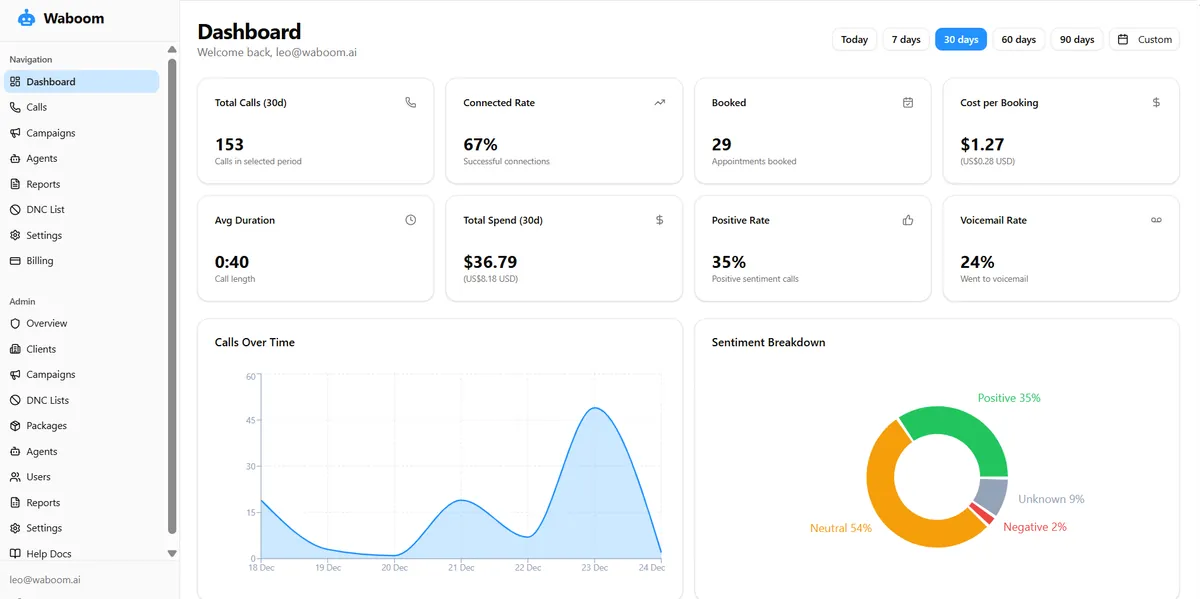
Live campaign analytics in the portal: connect rate, spend, bookings and sentiment as dials go out.
Inbound and outbound share the same knowledge base. An agent answering evening calls knows the same information as the one running your morning follow-up campaign. The full guide to implementing AI outbound is here.
The NZ Ministry of Business, Innovation and Employment publishes guidance on digital tools worth reading before you commit. The Australian Government Business website covers digital readiness for AU businesses in plain language.
Frequently Asked Questions
What is the difference between an AI voice agent and a virtual phone number?
A virtual phone number is a forwarding service. Calls arrive at your mobile as they always did. An AI voice agent answers the call itself, holds a conversation, and takes action, booking, qualifying, or transferring, without a human involved. They solve completely different problems.
How quickly does an AI voice agent respond to a caller?
The Waboom AI portal delivers a first response in under 800ms. Callers cannot detect a gap at that speed. The agent sounds like it picked up immediately. Full latency detail is here.
Does the AI agent disclose that it is not human?
Yes. AI disclosure runs on every call by default. This is a legal requirement under NZ and AU regulations and a Waboom AI compliance default, not an optional setting. Callers know they are speaking with an automated agent.
Where does my call data go?
The Waboom AI portal hosts transcripts and audit logs in Sydney. Live audio, recordings, and model inference run on infrastructure outside Australia. Waboom AI is transparent about this split and does not claim all data stays in Australia.
Can the agent book appointments directly, or does it just take a message?
It books directly. The agent calls a calendar integration mid-conversation, confirms a slot with the caller, and sends a confirmation. No message to chase up. No human needed to complete the booking.
What file types can I upload to the knowledge base?
The knowledge base accepts PDF, Word, plain text, markdown, CSV, spreadsheets, and HTML files up to 50MB each. Add your website URL as a source and it re-crawls automatically. Plain text and markdown retrieve more accurately than image-heavy PDFs because the system reads text content, not scanned images.
See what an AI receptionist costs on our pricing page.
Leonardo Garcia-Curtis
Founder & CEO at Waboom AI. Building voice AI agents that convert.
Ready to Build Your AI Voice Agent?
Let's discuss how Waboom AI can help automate your customer conversations.
Book a Free Demo

