
I listened to a call last week. Our AI agent for a real estate client calling 300 prospects a day. This particular call was tagged as a successful booking so I wanted to listen to it.
The agent did its job. Except it didn’t do it well.
There was this pause. That awkward 3 second gap where the caller’s waiting and the agent’s waiting. Everyone wondering if the line dropped.
Hear it for yourself.
Listen to the actual call. Pay attention to the pause between turns — that’s the 2,412ms gap we’re about to diagnose.
You’ve heard it. That silence where you know the prospect’s already checked out.
Three seconds doesn’t sound like much. But on a cold call? An eternity. The death of converting the person.
Three seconds. That’s how long your prospect waits while your AI agent figures itself out.
They’re already checking their watch. Already deciding this isn’t worth their time.
And the worst part? Every metric on your dashboard says everything’s fine.
The Numbers That Didn’t Add Up
So I pulled the data. Here’s what got me.
The AI model (GPT-4.1) was thinking in 244ms. That’s fast. Voice engine? 432ms. Amber but acceptable.
Speech recognition? 24ms. Knowledge base? 92ms. Fine.
Add it up: 792ms total. Under a second. But your caller was waiting 3,204ms.
Where did the other 2,412ms go? Someone owes me 2.4 seconds. This could be the difference of my client making $200k or nothing in a month from selling multiple houses.
The Ghost in the Machine
This is what drove me mad. We knew we had a latency problem. We could hear it.
Every component was running within spec. The AI was fast. The voice was fine. 2,412ms just vanished.
No metric told you where. The dashboards stayed green and the logs stayed empty. Nothing.
You’ve probably hit this exact wall. Your client rings and says “the AI feels slow.” You check the dashboard. Everything looks green.
You shrug. Tell them you’ll look into it. Three hours later you’re still digging through call logs hunting a ghost.
That’s what we were doing.
I hated not having the answer. Far out, I hated it.
How come nobody’s built this? Because we actually care about our partners and clients. So we built it ourselves.
So We Built the Thing That Should’ve Existed
We added a Call Latency & Quality panel to our admin dashboard. One screen. Every client. Every agent.
Here’s what you see at a glance:
E2E (p50 and p90) — The actual wait time your caller experiences.
LLM — How long the AI takes to think.
TTS — Text to speech conversion time.
Gap — The unaccounted latency. The number nobody else shows you.
That Gap column? The whole point.
It’s the difference between what the components report and what your caller actually experiences. Where your invisible problems hide.
Colour coded — green, amber, red. You see which agents need attention in one glance.
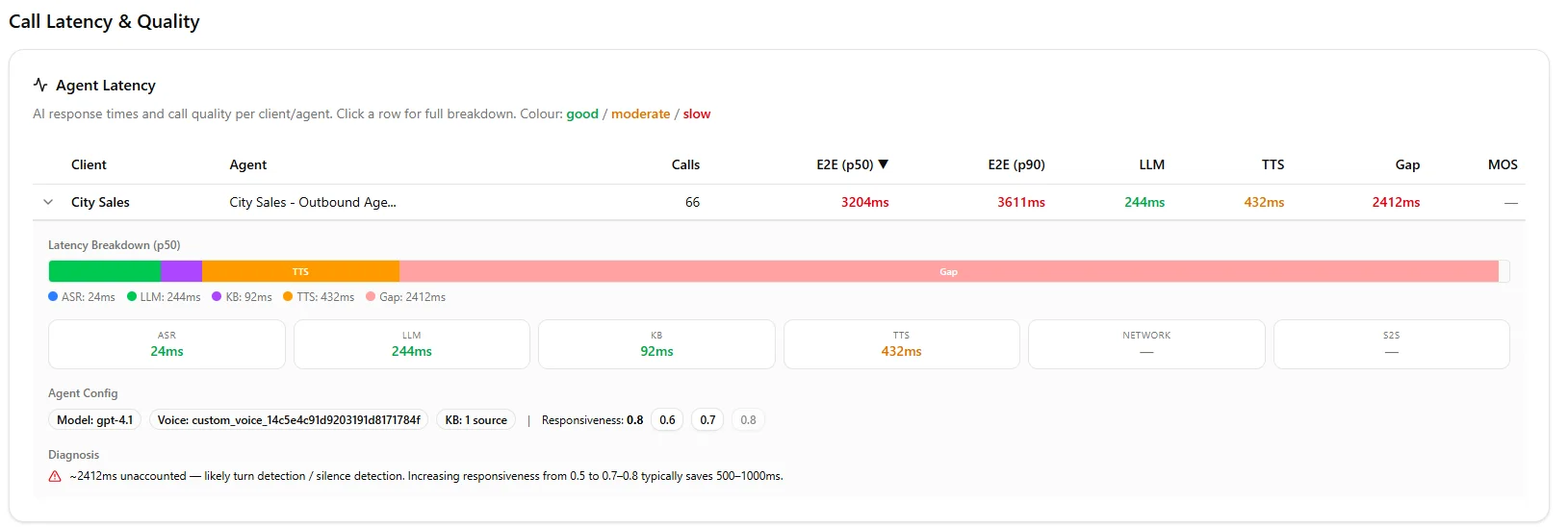
The latency breakdown for this agent. Every component looks green — except the Gap. 2,412ms of invisible delay the AI didn’t cause.
Click any agent and it expands. A stacked bar showing where your time goes. Then the auto diagnosis in plain English.
“2,412ms unaccounted — likely turn detection or silence detection. Increasing responsiveness typically saves 500 to 1,000ms.”
One click buttons to fix it. No need for you to log into another platform.
What We Found for This Agent
The culprit wasn’t the AI. Wasn’t the voice. Wasn’t the network.
It was the responsiveness setting. Here’s what that means for you.
Responsiveness controls how long the system waits to confirm the caller has stopped talking. When someone pauses mid sentence, do you jump in or wait?
The client had theirs at 0.6. Conservative. The system was waiting an extra 2.4 seconds every turn. Just in case.
We bumped it to 0.8. One click. Your next call comes through noticeably smoother.
One setting. 2,412ms recovered. That was it.
What 40+ Organisations Taught Me About Latency
Here’s what I wish someone told me on day one. (I burned through $4,000 in wasted support hours learning these the hard way.)
The AI model is almost never your bottleneck.
GPT-4.1 responds in 244 to 900ms. Consistently over 900ms? Our platform’s fast LLM tier cuts variance by 50%. Costs 1.5x more. Worth it for high volume.
Your prompt is probably too long.
Every extra paragraph adds thinking time. Keep it tight. Use sections — Identity, Style, Task. Got a big knowledge base? Use RAG to filter relevant chunks instead of stuffing everything in.
Format your knowledge base properly.
Markdown with clear headings gets retrieved more accurately than text dumps. Keep sections short. Use specific names and dates. Your default settings — 3 chunks, 0.60 threshold — work fine for most setups.
Geographic distance is real.
Our servers sit in Australia serving NZ and Aussie clients. Every hop adds milliseconds. I’ve seen agencies use US numbers for Auckland prospects. Mate. Don’t do that.
Watch for the turtle icon.
In your agent config, features adding latency get flagged with a turtle emoji. If your estimated latency exceeds 1.5 seconds, start turning those off.
Responsiveness is your hidden lever.
Dropping it by 0.1 adds roughly 500ms of wait time per turn. Compounds fast. Most of your agents will run fine at 0.7 to 0.8.
Split your conversation flows.
One node collecting name, phone, and address? Your agent skips fields. Break it up. Using Flex Mode? Keep it under 20 nodes or you’ll get hallucinations.
Boosted keywords save you embarrassment.
Add brand names, people’s names, industry terms. We learned this deploying for Sprint Fit and Barfoot & Thompson. Without boosted keywords, speech recognition mangles your brand name into something I can’t repeat here.
The Actual Cost of Slow AI
Here’s what nobody talks about.
A 3 second delay doesn’t just feel awkward. It costs you money. We’ve seen completion rates drop 15 to 20% when E2E crosses 2.5 seconds.
People hang up. Or they stay but they’re irritated. The transfer to your sales team starts on the back foot.
One client was running 6,000 calls in a month. Lose 30% to latency hangups — that’s 1,800 lost conversations.
Why We Built This Into Our Portal
Every AI calling platform gives you latency numbers. Ours shows E2E, ASR, LLM, TTS.
But they show you components. They don’t tell you what to do about it.
“Your E2E is 3,204ms.” Cool. Which part? “Here’s each component.” They all look fine. “Good luck.”
Sound familiar?
Our panel does the diagnosis for you. Finds the gap. Tells you the cause. Gives you a button to fix it.
You shouldn’t need to be a latency engineer to keep your clients’ calls smooth.
One screen. Red number. Click. Fixed.
You’ve heard that pause on a call. That silence where the prospect’s slipping away. It’s probably not the AI.
It’s a setting you didn’t know existed. Hiding in a gap nobody was measuring. Until now.
Frequently Asked Questions
What is E2E latency in AI voice calls?
E2E (end-to-end) latency is the total time from when a caller stops speaking to when the AI agent starts responding. It includes speech recognition, AI thinking time, knowledge base lookup, text-to-speech, and network delays.
Anything above 2.5 seconds significantly hurts call completion rates.
Why does my AI agent feel slow when all metrics look green?
The individual components (ASR, LLM, TTS, KB) may each be fast, but there’s often a hidden “gap” caused by turn detection and silence detection settings.
This gap doesn’t show up in standard component metrics. Our diagnostic panel surfaces this invisible latency.
What is the responsiveness setting and how does it affect latency?
Responsiveness controls how long the system waits to confirm a caller has finished speaking before processing. A lower setting (like 0.6) means the system waits longer, adding up to 2+ seconds of delay per turn.
Most agents perform well at 0.7 to 0.8.
How much latency is acceptable for AI voice calls?
Industry best practice is under 1.5 seconds E2E. Above 2.5 seconds, call completion rates drop 15 to 20%.
The sweet spot for natural conversation is 600ms to 1,200ms E2E.
Leonardo Garcia-Curtis
Founder & CEO at Waboom AI. Building voice AI agents that convert.
Ready to Build Your AI Voice Agent?
Let's discuss how Waboom AI can help automate your customer conversations.
Book a Free Demo

