
Every call ends and you have no idea what was said. The receptionist line rang fourteen times yesterday. Someone booked. Someone complained. Someone asked for a quote on a forty-thousand-dollar job. You found out none of it.
Post-call analysis is the layer that reads every transcript the second the call ends. No one listens back. The agent does the listening. It tags what happened, fires the right alert, and writes the structured data into your CRM before the caller has reached the car park. That whole layer ships with every Waboom AI voice agent.
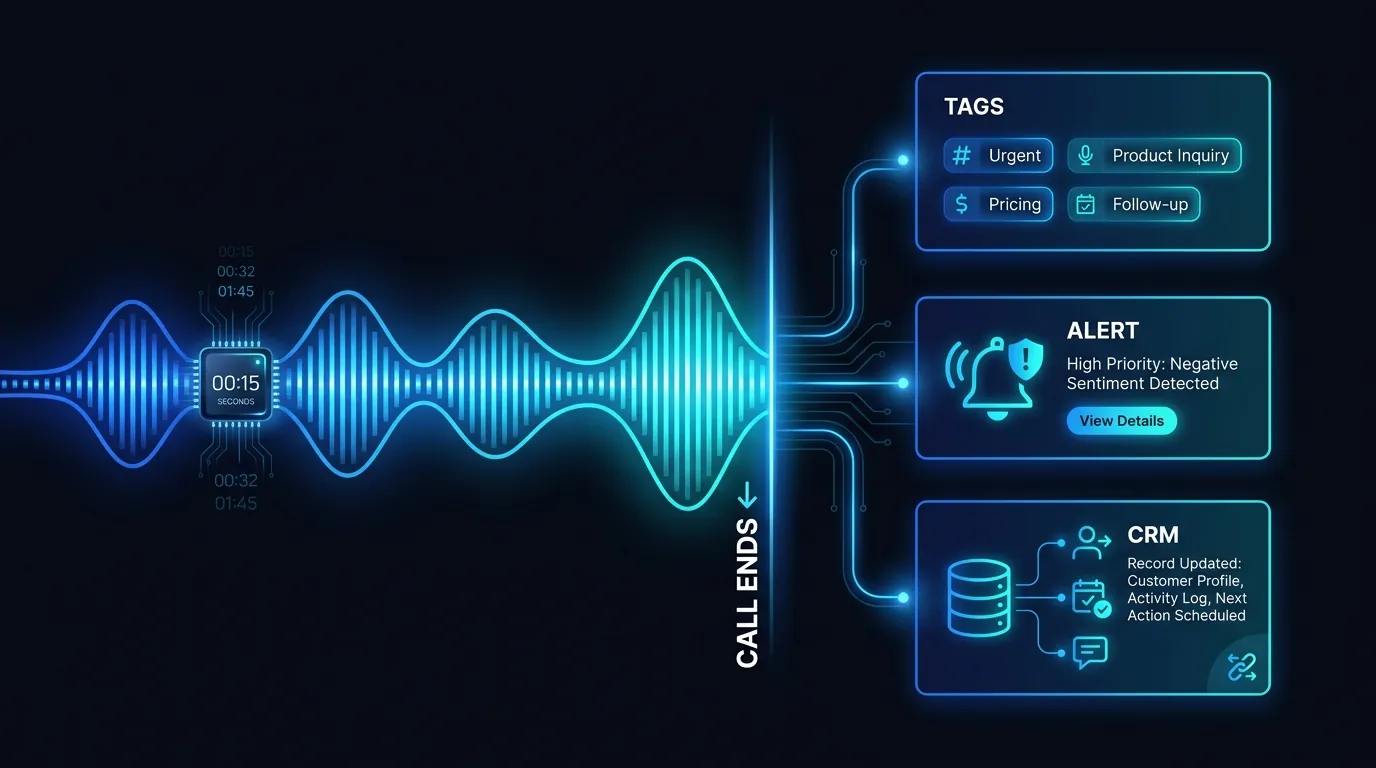
The call ends, the agent reads the transcript, and the intelligence is routed before the caller reaches the car park.
What is post-call analysis on an AI voice agent?
Post-call analysis is the step where our platform reads the full transcript the moment a call ends, then classifies what happened. It produces call tags, an outcome, a short summary, and structured fields. All of it lands within seconds. No human listens to the recording first.
Think of it as a colleague who sat through every call and took perfect notes. Except this colleague never forgets. Never gets distracted. Works at 2am. Every call answered by the agent gets the same treatment. The forty-second booking and the four-minute complaint both get read, tagged, and routed.
The economics make this trivial. An average answered call runs about thirty seconds, roughly forty cents at our 80 cents a minute. The analysis on top costs you nothing extra. You are already paying for the call. Now you get the intelligence from it for free.
Why is "listen back later" a waste of time?
Listening back later means the insight arrives too late to act on. By the time someone replays a recording, the hot lead has gone cold and the angry caller has already left a review. The value of a call decays by the minute. Manual review throws that value away.
Run the numbers on a single day. Say the agent answers fifty calls. At three minutes a recording, that is two and a half hours of listening just to know what happened. No one does that. So the recordings sit there. Unwatched. The quote request from Tuesday surfaces on Friday, if at all.
That delay has a price. A quote request answered within five minutes is far more likely to convert than one answered the next day. Every hour you wait, the buyer is ringing your competitor. Post-call analysis collapses that gap to seconds.
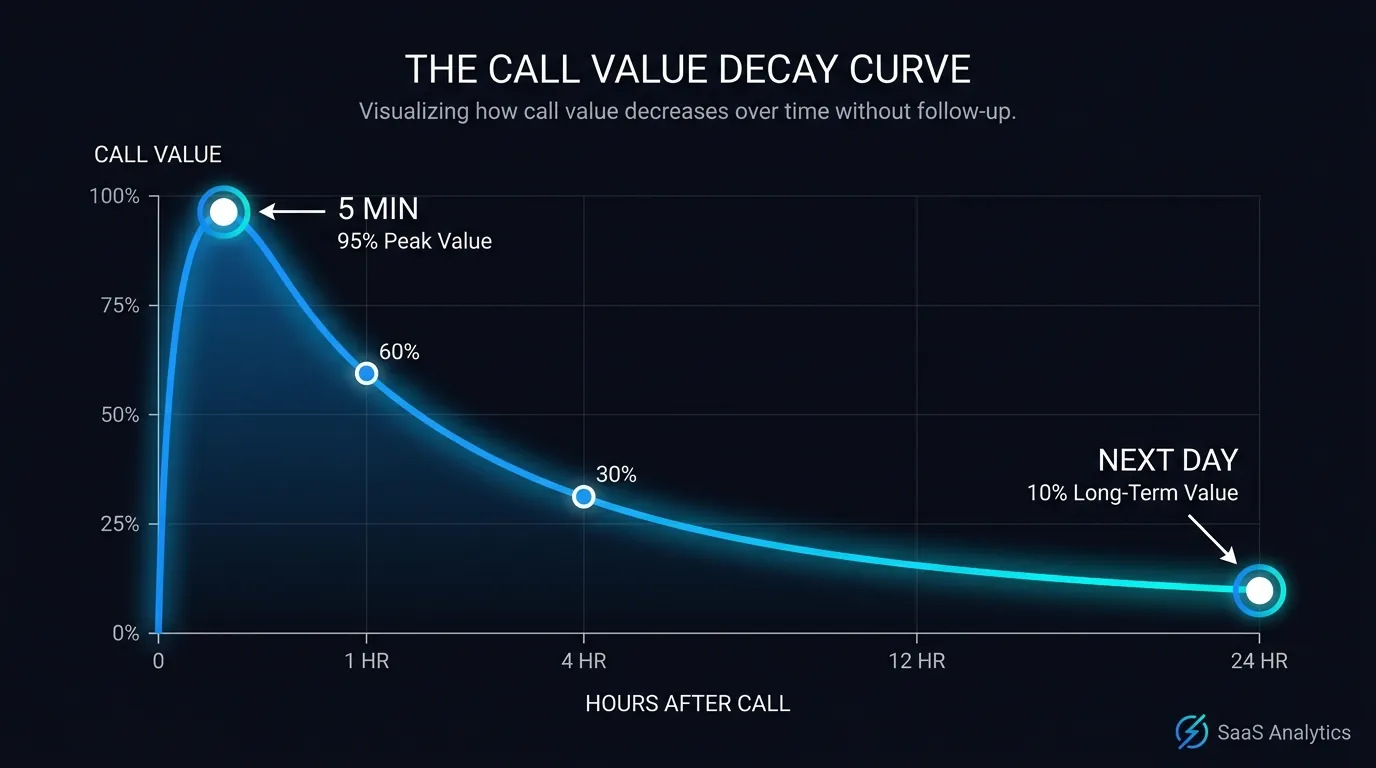
A call left for someone to replay later loses most of its value by the time anyone listens.
How does the agent tag what happened on each call?
The agent reads the transcript and matches it against the outcomes you care about. You define the tags during setup. Quote request. Booking made. Complaint. Wrong number. Callback wanted. The agent assigns one or more to every call based on what the caller actually said.
This is not keyword matching. The agent understands intent. A caller who says "I was wondering roughly what you would charge" gets tagged quote request even though they never said the word quote. A caller who sighs and says "this is the third time I have rung" gets tagged complaint. Context, not keywords.
You control the list. A roofing firm tags asbestos query and re-roof enquiry. A dental clinic tags new patient and emergency. We covered the mechanics in our guide to building a call tag set and alerts. The point is the taxonomy is yours.
Accuracy improves with volume. Across a 200-dial outbound campaign that costs about $100, the agent tags every dial, and you review the edge cases. Within a week the tags are clean. You stop guessing what your phone line is doing.
How do tag alerts get the right call to the right person?
Each tag can trigger a different alert to a different person. A quote request pings the salesperson. A complaint pings the manager. A booking drops into the calendar. The routing happens seconds after the call ends, so the right human acts while the call is still warm.
Picture the salesperson at lunch. The agent answers a call, hears a quote request on a big job, and tags it. It sends a notification with the caller number and a two-line summary. The salesperson rings back before the soup is cold. That is the whole point. Speed.
The manager gets a different feed. They never see the routine bookings. They only get pinged on complaints and escalations, so their phone stays quiet until something actually needs them. The alerts are filtered by tag, so no one drowns in noise.
This is the same mechanism we describe in our piece on call tags and voice agent alerts. It pairs with mid-call functions that fire actions during the conversation. One fires live. The other fires the instant the call ends. Together they cover the whole call.
Stop guessing what your phone line is doing.
See how a Waboom AI voice agent tags, alerts and records every call automatically, in NZ or AU.
What data lands in your CRM after a call?
A structured record lands in your CRM seconds after the call ends. Caller number, name if captured, the tags, the outcome, a short summary, and any custom fields you defined. It maps straight onto a contact or a deal. No one types anything.
Here is the day-to-day version. The agent answers, the caller asks to book a site visit, and the agent collects the details. The instant the call ends, a deal is created or updated with the address, the job type, and the preferred date. Your salesperson opens the CRM and the lead is already there, tagged and timestamped.
We go deep on this in our walkthrough of what data a voice agent captures. There is also our guide to CRM integration for NZ and AU teams. The short version is that the transcript becomes rows in your system of record. Searchable. Reportable. Permanent.
This is where the real case numbers come from. A Sydney sales agent produced 141 vendor leads in 90 days at $32.74 per seller. Every one was a structured CRM record, not a voicemail someone forgot to action. A Christchurch developer booked viewings at $7.12 each, each one written straight into the pipeline.
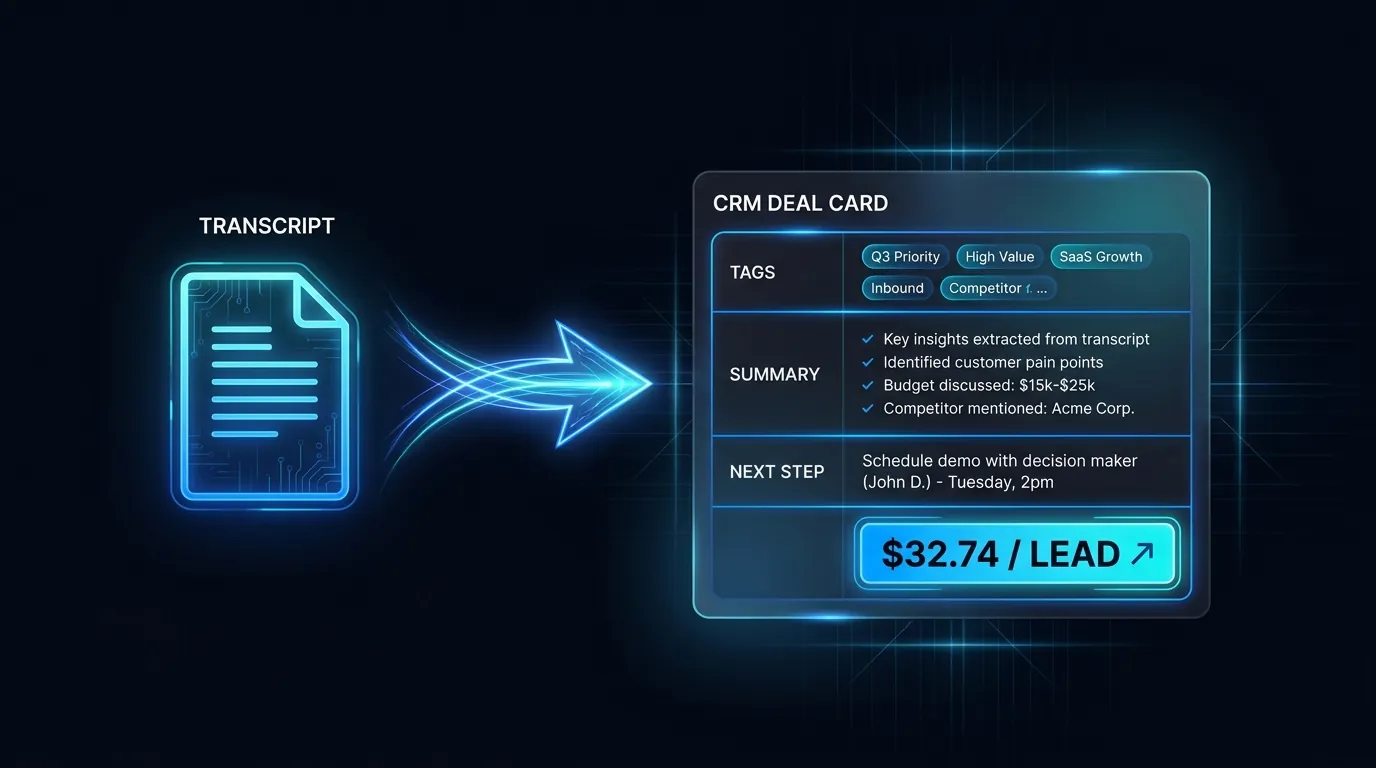
Each transcript becomes a structured deal in your CRM, like the 141 vendor leads at $32.74 a seller.
How do you track NPS or CSAT from the transcripts?
The agent can score sentiment and satisfaction from the language in each transcript, so you get a CSAT-style read without sending a survey. It flags frustrated callers, happy callers, and confused callers automatically. You watch the trend instead of chasing survey responses no one fills in.
Surveys have a response problem. Most people ignore them, so your score reflects the loud minority. Transcript scoring reads every single call, so your sample is one hundred percent. Fifty calls a day is fifty data points, not the three people who bothered to click a smiley face.
You can still ask the caller directly. The agent can run a one-question NPS at the end of a call and log the number. Most teams find the passive transcript read is enough to spot a problem early. A run of frustrated tags on Monday tells you something broke over the weekend.
What should you measure first?
Start with three things. Tag distribution, so you know what your phone line is actually for. Response time on hot tags, so you know how fast quote requests get actioned. And outcome rate, so you know how many calls turn into something. Everything else is secondary.
Most teams are shocked by the first one. They assume the line is mostly bookings and find half the calls are quote requests no one was capturing. That single insight pays for the whole system. You cannot fix what you never measured.
We lay out the full metric set in our guide to the receptionist KPIs worth tracking. Pick three, watch them for a fortnight, then add more. Trying to measure everything on day one is how dashboards end up ignored.
Where does my call data live?
A quick word on where this data lives, because buyers ask. Your portal, transcripts, and structured call records sit on our Sydney servers. Live audio is processed offshore by our voice infrastructure partner. The portal stores only the signed link to a recording, not the file itself. We meet cross-border accountability requirements through documented arrangements with that partner.
Every caller is told they are speaking with an AI. You can delete any record in ten minutes on request. We work within the NZ Privacy Act 2020 and the Australian Privacy Act 1988 and its 13 Australian Privacy Principles. The Office of the Privacy Commissioner and the OAIC both publish plain guidance if you want to read the source.
Turn every call into data, not a recording no one opens.
Book a walkthrough of a Waboom AI voice agent and watch post-call analysis tag a live call in seconds.
Frequently Asked Questions
Does post-call analysis work in real time?
It runs the instant the call ends, not during the call. The transcript is read, tagged, and routed within seconds of hang-up. For actions that need to happen mid-conversation, like checking availability while the caller waits, our mid-call functions handle that live instead.
What does post-call analysis cost on top of the call?
Nothing extra. You pay about 80 cents a minute for the call itself, billed by the second, and the analysis is included. An average thirty-second call costs around forty cents, and you get the tags, summary, and CRM record at no additional charge. The intelligence rides on top of the call you already paid for.
Can I define my own call tags?
Yes. You set the tag list during setup, and it reflects your business. A clinic might use new patient and emergency. A trades firm might use quote request and callback wanted. The agent assigns them by understanding what the caller meant, not by matching exact words, so the tags stay accurate as people phrase things differently.
Where are my transcripts stored?
Your transcripts and structured call records sit on our Sydney servers. Live audio is processed offshore by our voice infrastructure partner, and the portal holds only a signed link to each recording rather than the audio file. We meet cross-border accountability requirements through documented arrangements with that partner, and you can delete any record in ten minutes.
How accurate is the sentiment scoring?
It reads every call, so your sample is one hundred percent rather than the small slice who answer a survey. It reliably separates frustrated, happy, and confused callers, which is what you need to spot a problem early. For a precise number you can have the agent ask a one-question NPS at the end of the call and log the answer.
Does it replace listening to calls entirely?
For most calls, yes. You stop replaying recordings to find out what happened, because the tags and summary tell you. You still keep the recordings for the edge cases and for training, but you only open the ones the tags flag. That turns hours of listening into a two-minute scan of the exceptions.
Leonardo Garcia-Curtis
Founder & CEO at Waboom AI. Building voice AI agents that convert.
Ready to Build Your AI Voice Agent?
Let's discuss how Waboom AI can help automate your customer conversations.
Book a Free Demo

