
6 min read · Setup walkthrough · Last updated 13 May 2026
Part of Learn Claude Code: The Complete Operator's Guide. For the operator's overview of Skills, Connectors, Cowork, and Artifacts, start there.
If you are not a developer, you live in spreadsheets. That is where the data sits, the budget gets argued, the pipeline gets tracked.
Claude for Excel turns the spreadsheet from a place you do work into a place you ask for it.
This is the 15-minute setup for non-developers. What to install, what to try first, and the safety habit worth building from day one.
What Claude for Excel actually is
It is an add-in that lives in the Excel ribbon. You open a workbook, click Claude, ask a question in plain English about your data, and Claude reads the sheet and answers.
If your question is "tell me about this", Claude responds in chat.
If your question is "build the pivot", "clean column C", or "write a formula in the totals row", Claude proposes the change. It asks for your permission before touching the sheet.
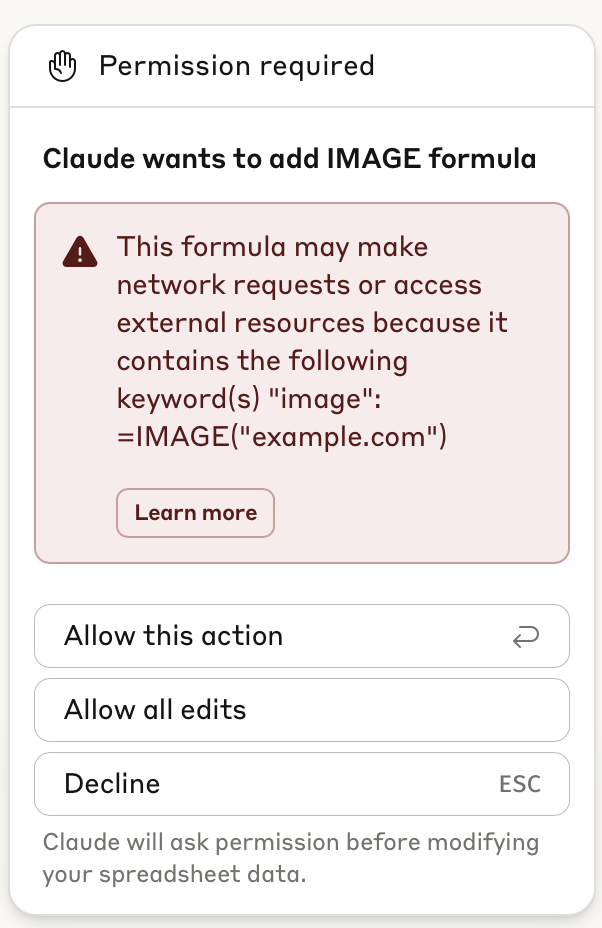
The permission step is the most important habit. Every formula Claude wants to write, every cell it wants to modify, you approve.
What it can actually do
Anthropic groups the capabilities into seven buckets:
Plans and platforms
Claude for Excel is on the Pro, Max, Team, and Enterprise plans (not the free tier). It runs on Excel for the web, Windows, Mac, and iPad.
Older Excel 2016/2019 perpetual licences are not supported, and it works on .xlsx and .xlsm files only. No VBA, macros, or legacy data tables.
The permission flow
This is what the approval dialog actually looks like. Every time Claude wants to add or edit a formula, the dialog pops up with the proposed change. You choose: allow this action, allow all edits (for the session), or decline.
It is friction, but it is also safety, because spreadsheets break easily. The approval dialog is what stops Claude from corrupting your data when you misphrase a request.
Keep "allow this action" as your default for the first month. Graduate slowly.
The 15-minute setup
1. Install the add-in
Open Excel. Go to Insert > Get Add-ins. Search "Claude". Click Add.
It shows up as a new icon in the ribbon. You may need to restart Excel for it to appear cleanly.
2. Sign in with your Anthropic account
Click the Claude icon. A side pane opens and asks you to sign in. Use the same account you use for Claude Desktop and Claude.ai. Skills you have already added to your account work here too.
3. Open a real workbook and try one prompt
Start with something that does not modify your sheet. A read-only question.
Examples that work well:
You get a written answer in the side pane. Sheet unchanged. You confirm Claude can read what you expect it to read.
Three things to do on day one
1. Clean a messy column
Find a sheet where a column has inconsistent formatting (dates that mix DD/MM and MM/DD, names with extra spaces, currency symbols mixed with plain numbers).
Ask: "Normalise column [X] to consistent [format]. Show me the before/after on the first 5 rows before applying."
Claude proposes the formulas. You approve.
2. Write a formula in plain English
Stop searching Stack Overflow for "VLOOKUP across sheets with conditional".
Ask: "In cell H2, write a formula that finds the value in column B of Sheet2. Match on Sheet2 column A equals column A of this row."
Claude writes the formula, you inspect it, you approve.
3. Build a pivot
The big one for time-poor managers.
Ask: "Build a pivot of revenue by month and product. Place it in a new sheet called 'Pivot'."
Claude proposes the pivot structure and you approve. Two minutes of work becomes one prompt.
The skill that compounds Excel
Building that spreadsheet skill alongside us is one of the most-asked-for outcomes at our Claude Code workshops in Auckland. Accountants, ops managers, finance leads. Every one of them leaves with their finance-spreadsheet skill running.
The biggest unlock: pair Claude for Excel with a skill that knows your spreadsheet structure.
We have a skill called finance-spreadsheet that knows our column conventions, our category codes, and our reporting format. Every time we open a finance spreadsheet, that skill steers what Claude does inside Excel.
Building one is the next move. The 15-minute walkthrough is here.
What to do next
Install the add-in tonight. Tomorrow, open one real workbook and run a single read-only prompt to see what Claude pulls.
Then build a finance or operations skill that captures how you format your sheets. That is the step that compounds.
Anthropic's official setup guide for Claude for Excel is at support.claude.com.
Frequently asked questions
What is Claude for Excel?
It is an add-in that lives in the Excel ribbon. You open a workbook, click Claude, and ask a question about your data in plain English.
Ask it to explain something and it answers in chat. Ask it to build a pivot, clean a column or write a formula and it proposes the change first.
Which Claude plans include Claude for Excel?
Pro, Max, Team and Enterprise. It is not on the free tier.
Which versions of Excel does it work with?
Excel for the web, Windows, Mac and iPad. Older Excel 2016 and 2019 perpetual licences are not supported.
It works on .xlsx and .xlsm files only, so no VBA, macros or legacy data tables.
Can Claude change my spreadsheet without asking?
Not without your approval. Every formula and every cell edit hits a dialog first. You allow that one action, allow all edits for the session, or decline.
Keep "allow this action" as your default for the first month. Spreadsheets break easily. That dialog is what stops a misphrased request corrupting your data.
What can Claude actually do inside Excel?
Anthropic groups it into seven buckets. It reads and explains a workbook with cell-level citations. It updates assumptions while keeping formula dependencies intact.
It builds models from scratch and fills templates from a PDF. It debugs errors like #REF and #VALUE back to the source cell. It runs native operations like sort, filter and pivot. And it uses any Skills and Connectors you already have enabled.
How long does the setup take?
About 15 minutes. Open Excel, go to Insert then Get Add-ins, search Claude and click Add. You may need to restart Excel for the icon to appear cleanly, then sign in with the same account you use elsewhere.
Self-paced
The free Claude Skills 101 course. Build a skill that styles every Excel output to your conventions. One hour total.
Start Claude Skills 101 →Hands-on with us
Live workshop sets up Claude for Excel on your real workbooks. You leave with three workflows that save hours every week.
See the workshop →If your team wants hands-on help, see Waboom's AI team training.
Leonardo Garcia-Curtis
Founder & CEO at Waboom AI. Building voice AI agents that convert.
Want your team to actually use these tools?
Waboom AI runs hands-on AI training and Claude workshops for teams across New Zealand and Australia.
Explore AI Team Training