8 min read · Projects setup walkthrough · Last updated 13 May 2026
Part of Learn Claude Code: The Complete Operator's Guide. For the operator's overview of Skills, Connectors, Cowork, and Artifacts, start there.
You open Claude. You start a chat. You explain who you are, what you do, the format you want, the audience, the brand voice. You get a useful answer.
Tomorrow you do it again. From scratch.
Projects solve that for you. One setup, and every chat in the Project inherits it.
This guide is the 5-minute setup. Then three real Projects we run at Waboom AI. Then the stack that makes Projects feel like an operating system, not a chat history.
A Project is not a chat. It is a workspace.
A chat is one conversation you have, then gone.
A Project is a folder with a brief and reference files. Every chat you start inside that Project starts from that brief, with those references already in Claude's head.
Anthropic's own definition: "Projects in Claude Cowork let you group related tasks into dedicated workspaces with their own files, context, instructions, and memory."
You configure the Project once. You re-use the context every time. Same as a junior teammate after a quarter on the account: they no longer need the client re-explained every Monday.
What lives inside a Project
Anthropic groups the contents of a Project into 5 things, every one of which Claude uses on every task in that Project:
That last one is the real payoff. Inside a Project, Claude is no longer amnesiac between chats.
The three ways to start a Project
When you click New Project inside Claude Cowork, you get three creation paths. Pick the one that fits where your work already lives.
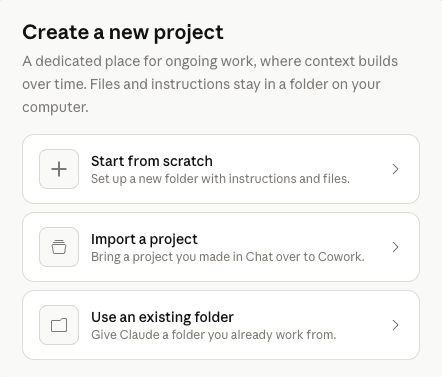
1. Start from scratch
A fresh folder with instructions and files. Use this when the work is new and you want Claude to learn it from a clean slate.
2. Import a project
Bring a project you already built in Claude Chat over to Cowork. Same instructions and reference files, now with Cowork's autonomous capabilities on top.
3. Use an existing folder
The shortcut. Point Claude at a folder on your computer that already holds the work (client meeting notes, a project tracker, last quarter's reports). Claude reads from it, writes back to it. No copy-paste, no upload step.
The 5-minute setup
Whichever creation path you picked, the setup dialog is short. Name, instructions, attached files, save location. That is it.
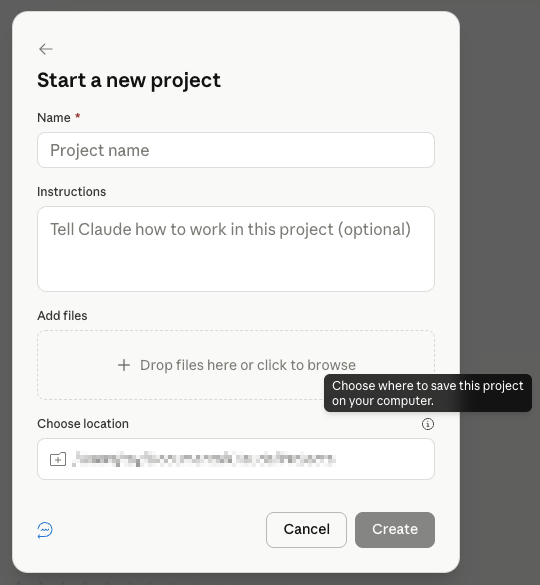
1. Open Projects
In Claude.ai or Claude Desktop, you look for the Projects panel in the sidebar. Click New Project.
2. Name it specifically
"Marketing" is too vague. "Acme Corp marketing retainer" is sharp. The name becomes a label you scan past, so make it findable in three seconds.
3. Write the brief (the most important field)
This is the instruction paragraph that Claude reads at the top of every conversation in this Project. Keep it short and load-bearing.
Use the same 4-part frame from Karol Zieminski's playbook:
Here is a real brief from our "Acme Corp retainer" Project, so you can see the shape:
End state: marketing copy that sounds like Acme's founder writesit. Direct, slightly informal, NZ English.
Format: short paragraphs, fragments are fine, no em-dashes.
Audience: NZ small-business owners under 50 staff. Time-poor.
Constraints: never use exclamation marks, never use the passive voice,
"moving forward". Never make up case study numbers.
4. Drop in 3-5 reference files
The Project Knowledge section is where you load the long-form context for your work. Things Claude needs to see but does not need on every chat.
For your client Project: brand guide, past examples of good copy, the client's product one-pager, recent customer interview notes. 3-5 files is the sweet spot. More than that and the Project starts feeling slow.
5. Test it
Start a new chat inside the Project. Ask Claude something specific. Watch if the brief and references actually steer it.
They usually do. If they do not, the brief is too vague, so sharpen it.
That is the whole setup. Your first one takes 15 minutes, and every Project after takes 5.
RAG inside Projects (and why it matters)
Project Knowledge uses Retrieval Augmented Generation. Plain English for you: Claude does not read all your reference files top to bottom every time. It searches them, pulls the relevant chunks, and uses those.
This is why you can drop a 200-page brand guide in there without slowing things down. Claude only loads the bits that match the current task.
Practical implication: name your reference files clearly. "brand-voice-guide.md" beats "doc1.pdf". The names show up in Claude's search.
Three Projects we run at Waboom AI
Want to set up a Project alongside a coworker? We walk through this client-by-client at the AI training we run across NZ and Australia. Bring a real client folder, leave with a working Project.
Project 1: One per retainer client
Every retainer client gets a Project. Brief = how they talk, what they sell, what we are working on this quarter. References = brand guide, last three campaigns, customer notes.
The win: any team member can hop in and continue a draft without re-onboarding to the client.
Project 2: Blog pipeline
One Project for blog work. Brief = our voice rules, our SEO structure, our no-AI-tells list. References = the voice DNA JSON, three of our best posts, the topic backlog.
Every blog draft starts inside this Project. The output drift across writers and weeks has dropped close to zero.
Project 3: Outreach pipeline
Our cold outreach Project. Brief = ICP definition, target list criteria, the email sequence. References = our 5 best-performing emails, a discovery script, an ICP one-pager.
Every new prospect research session runs in this Project. The reasoning Claude does is consistent because the framing never wobbles.
Projects + Skills + Connectors = your operating stack
A Project on its own is good. A Project with skills and connectors is what we mean when we tell you about an operating stack.
All three together: Claude has the context (Project), the workflow (Skill), and the access (Connector). That is the difference between Claude as a clever chat tool and Claude as a coworker.
Common stumbles
The brief is too long. If it runs more than 6-8 lines, you are putting reference content in the wrong field. Move long material to the Knowledge files.
Reference files are unnamed or vague. Claude searches by name first, so "doc1.pdf" is invisible. Rename it.
One Project for everything. The whole point of Projects is separation. If your Project covers three different domains, split it. Three small Projects beat one giant one.
What to do next
Set up one Project this week. Pick the work you do most often and re-explain most often.
Then layer a skill on top. The combination is what makes the difference.
Frequently asked questions
What is a Claude Project?
A Project is a workspace, not a chat. A chat is one conversation and then it is gone. A Project is a folder with a brief and reference files.
Every chat you start inside it begins with that brief and those references already loaded. You configure it once and reuse the context every time.
What can I put inside a Claude Project?
Five things, and Claude uses all of them on every task in that Project. Instructions covering your tone, formatting and rules. Files it reads each time. Context, which can be a local folder, a linked chat project or a URL.
Then scheduled tasks scoped to the Project, and memory. Memory is the real payoff: inside a Project, Claude is no longer amnesiac between chats.
How do I start a Claude Project?
Click New Project in Cowork and you get three paths. Start from scratch for new work. Import a project you already built in Claude Chat. Or point Claude at an existing folder on your computer.
The third is the shortcut. Claude reads from that folder and writes back to it, so there is no upload step.
What should I write in the Project brief?
Keep it short and load-bearing, and cover four things. The end state, meaning what good output looks like. The format.
Then the audience who reads the work, and the constraints, meaning what must never happen.
Name the Project specifically too. "Marketing" is too vague. "Acme Corp marketing retainer" is findable in three seconds.
How long does it take to set up a Project?
About five minutes. The setup dialog is just a name, the instructions, any attached files, and a save location.
Self-paced
The free Claude Skills 101 course is six short modules, one hour total. It builds the skill layer that makes your first Project actually sing.
Start Claude Skills 101 →Hands-on with us
Live workshop covers Projects + Skills + Connectors as one stack. Bring a real client or workflow, leave with a working Project.
See the workshop →To go deeper with your whole team, look at Waboom's AI training programmes.
Leonardo Garcia-Curtis
Founder & CEO at Waboom AI. Building voice AI agents that convert.
Want your team to actually use these tools?
Waboom AI runs hands-on AI training and Claude workshops for teams across New Zealand and Australia.
Explore AI Team Training