6 min read · Automation playbook · Last updated 13 May 2026
Part of Learn Claude Code: The Complete Operator's Guide. For the operator's overview of Skills, Connectors, Cowork, and Artifacts, start there.
You have the same boring jobs every week: the Monday-morning briefing, the Friday wrap-up, the daily inbox triage.
They take 20 minutes each. They never feel important enough to fix.
Claude Cowork can schedule them.
You write the task once. Cowork runs it at the time you specify, every recurrence, forever. You read the output over coffee.
This is the 60-second setup plus five jobs worth automating today.
The 60-second setup
Where this lives: scheduled tasks are a Claude Desktop feature. If you only use claude.ai in a browser today, you need the desktop app for this one. Download Desktop, sign in, then come back.
1. Open the Cowork tab
Top of the Desktop app, you will see three tabs: Chat, Cowork, Code. Click Cowork. The left sidebar shows New task, Search, Scheduled, Dispatch, Ideas, Customize, Projects.
2. Click Scheduled in the sidebar, then + New task
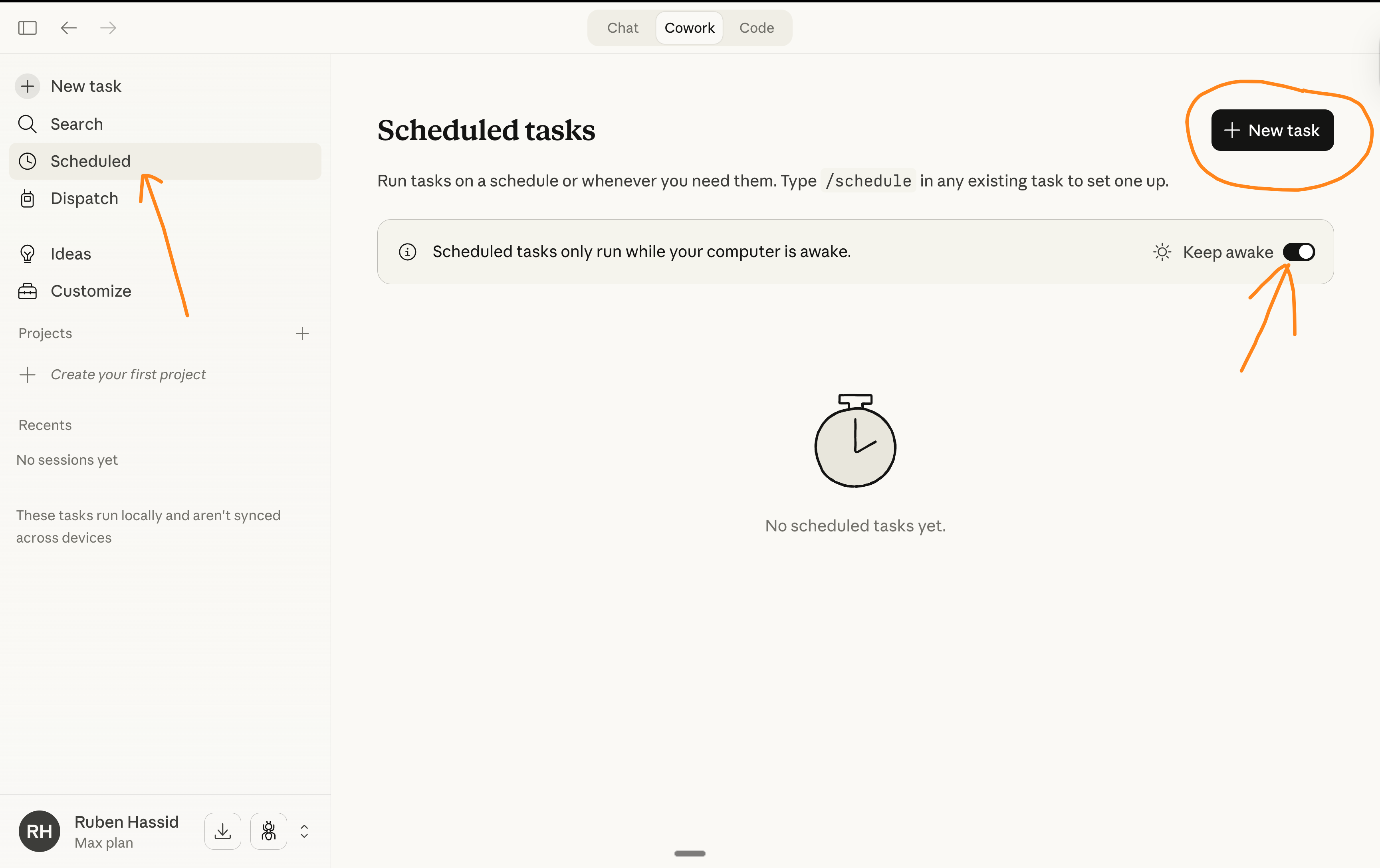
The empty state tells you "Scheduled tasks only run while your computer is awake". Toggle Keep awake on (top right) so the laptop does not sleep through your 7am job.
3. Fill the four fields
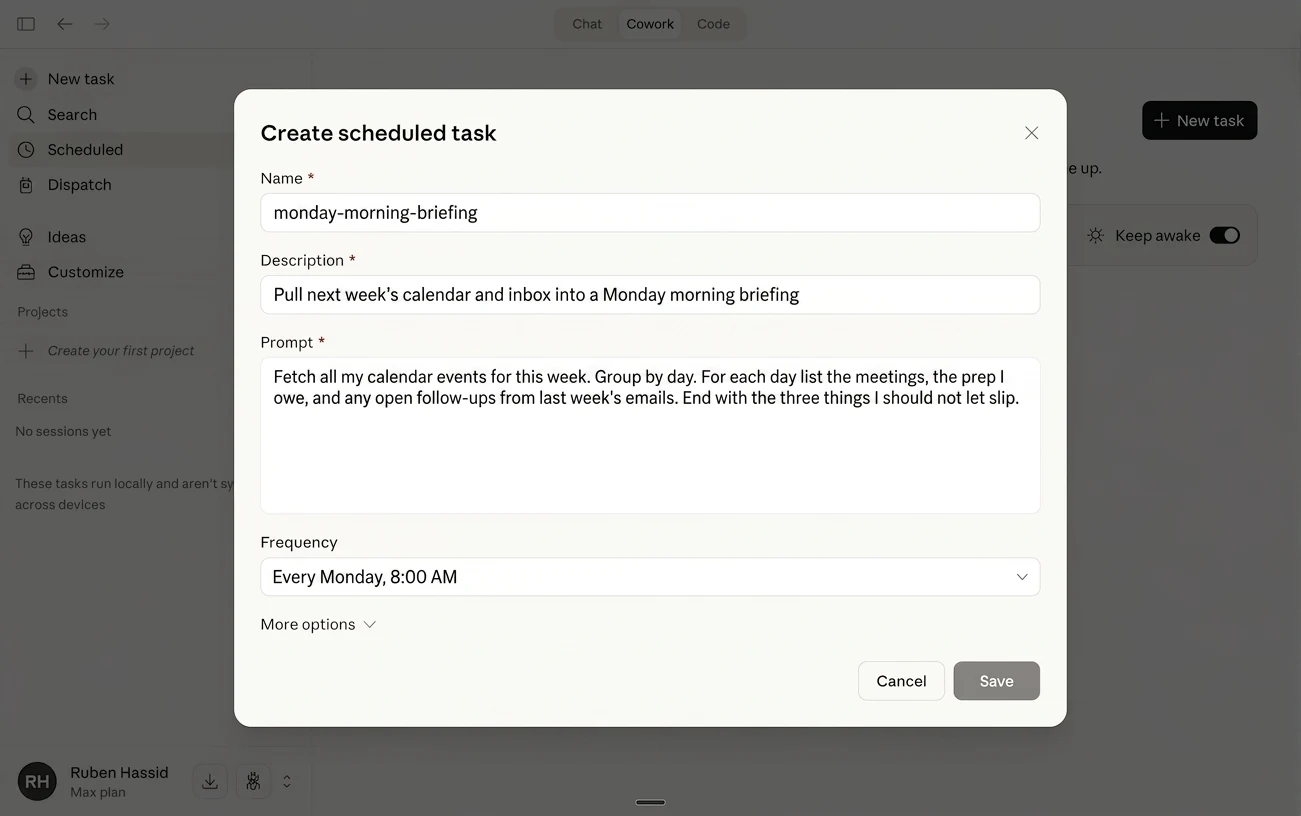
A dialog opens with four fields:
monday-morning-briefingHere is the dialog filled in for the Monday morning briefing (the first example below):
4. Hit Save
Done. The task fires at the specified time. Output lands in your Cowork session list, ready to read.
Five jobs worth automating today
1. Monday-morning briefing from your calendar
Time: Mondays at 7:30am. Connectors needed: Google Calendar or Outlook.
Fetch all my calendar events for this week. Group by day.For each meeting, note the attendees and any notes I left in
the description. Surface the three most important meetings
and what I need to prep for each. Output as a single Notion
page in the "Week briefings" database.
Read it over your first coffee Monday morning. You know what your week looks like before you sit down.
2. Friday wrap-up from your meeting notes
Time: Fridays at 5pm. Connectors needed: Notion or Google Docs.
Pull every meeting note I wrote this week from the "Meetings"Notion database. Group by client. For each client, write a
one-page summary covering decisions, open items, and what we
promised by when. Save each summary as its own page in the
"Client weekly digests" Notion database.
You read these Saturday morning. Mondays start with momentum instead of catch-up.
3. Daily inbox triage with draft replies
Time: Weekdays at 8am. Connectors needed: Gmail or Outlook (read + draft, not send).
Read my inbox from the last 24 hours. Group messages bysender. Flag the three that need a response today. For each of
those three, draft a reply in my short, direct tone and save
the draft in Gmail. Output a summary listing what was drafted.
You walk to the desk at 8:30. The three drafts are ready. You read, tweak, send. Triage time drops from 20 minutes to 5.
4. Weekly sales digest from your CRM
Time: Mondays at 7am. Connectors needed: HubSpot, Pipedrive, or your CRM.
From my Pipedrive pipeline, summarise: deals that moved stagethis week, deals stuck more than 14 days, deals likely to close
in the next 7 days. Output as a one-page brief I can read in
two minutes. Highlight any deal worth more than $10k that has
not had activity in 7+ days.
Reading time over coffee. Action triggers fall out naturally.
5. Sunday-night blog idea generator
Time: Sundays at 9pm. Connectors needed: Web search.
Search the web for the three most interesting articlespublished this week in [your industry]. For each, give me a
2-sentence summary and a "what we could write about this"
angle. Save as a Notion page in "Blog idea backlog".
You sit down Monday with three fresh angles already framed for your voice.
Always ask for a change log
Wiring up your first three scheduled tasks live is one of the bigger unlocks you get at our Claude Code training. Most operators leave with all five from this post already running on a schedule.
This is Karol Zieminski's rule and it applies double to scheduled tasks. You are not watching the work happen. The change log is your audit trail.
Add this line to every scheduled prompt you write:
Also write a what-changed.md noting every file you created,every draft you saved, and any decision you made that I should
review later.
The audit takes 10 seconds. The peace of mind is permanent.
A note on safety
Scheduled tasks run while you are not watching. That changes the calculus.
Two rules to follow from day one:
Once you have run scheduled tasks for a month and the change logs all look clean, you can graduate to higher-trust automations.
What to do next
Pick one job from the five above, the one that annoys you most every week, and set it up tonight in 60 seconds.
By next Monday it runs without you. That is the gateway, and from there your brain spots the next 10.
Anthropic's official scheduled tasks guide is at support.claude.com.
Frequently asked questions
Where do Claude scheduled tasks live?
In Claude Desktop, not the browser. Open the Cowork tab, then click Scheduled in the left sidebar.
If you only use claude.ai in a browser today, you need the desktop app for this one.
Do scheduled tasks run when my computer is asleep?
No. Scheduled tasks only run while your computer is awake, which is the single thing that catches people out.
Toggle Keep awake on so the laptop does not sleep through a 7am job.
What do I need to fill in to schedule a task?
Four fields. A short kebab-case name. A one-line description for your future self scanning the list. The prompt, which you should treat as a brief rather than a chat message. And the frequency.
How often can a scheduled task run?
You pick from a dropdown with options like every Monday at 8:00 AM or daily at 7:00 AM. There is also a Manual option if you want it to run only when you click.
Where does the output go?
Into your Cowork session list, ready to read. If your prompt says to save somewhere specific, like a Notion database, it writes there instead.
How long does it take to set one up?
About 60 seconds once you know where the screen is. Open Cowork, click Scheduled, click New task, fill four fields, hit Save.
Self-paced
Six short modules. Skills are the workflow layer that makes every scheduled task feel like you wrote the output.
Start Claude Skills 101 →Hands-on with us
Live workshop wires up three real scheduled tasks for your business. You leave with a Monday morning that writes itself.
See the workshop →We run hands-on AI training for teams across NZ and Australia.
Leonardo Garcia-Curtis
Founder & CEO at Waboom AI. Building voice AI agents that convert.
Want your team to actually use these tools?
Waboom AI runs hands-on AI training and Claude workshops for teams across New Zealand and Australia.
Explore AI Team Training