6 min read · Plain-English explainer · Last updated 13 May 2026
Part of Learn Claude Code: The Complete Operator's Guide. For the operator's overview of Skills, Connectors, Cowork, and Artifacts, start there.
The single most common question we get from people learning Claude: "What is the difference between Skills and MCP, and which one do I need?"
Short answer: they solve different problems.
Most beginners only need a skill. Some advanced cases need both.
Almost no one needs MCP without ever needing a skill on top.
This post is the kitchen analogy, the side-by-side, the "if you only read one thing", and the recommendation by use case.
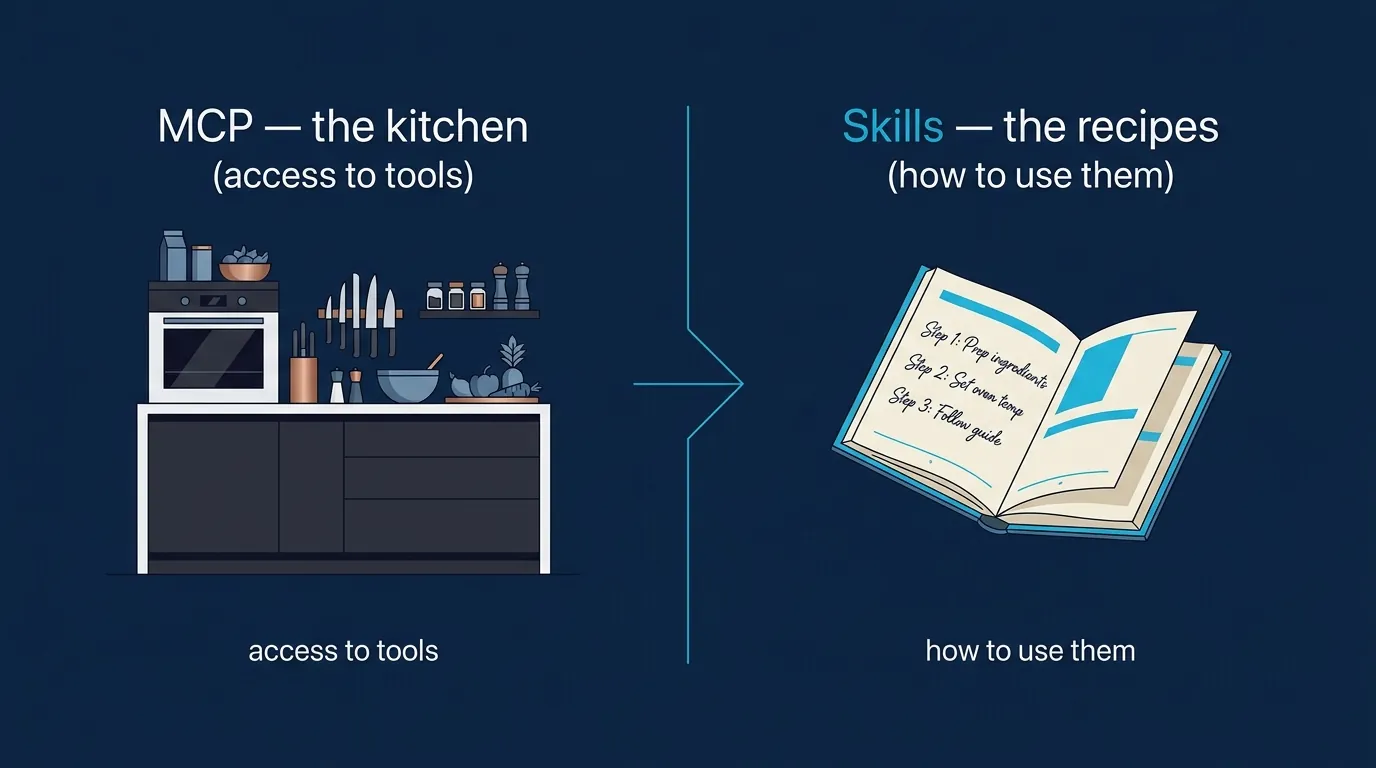
The kitchen analogy
Imagine a professional kitchen.
The kitchen has knives, pans, an oven, a fridge full of ingredients, and a walk-in pantry.
Without those things, you cannot cook.
With them, you have access to everything you need to make a meal.
That is MCP.
The Model Context Protocol gives Claude access to your tools and your data.
A Linear MCP server lets Claude read and create Linear tickets. A Notion MCP server lets Claude read and write Notion pages. A Gmail MCP server lets Claude draft email replies.
Think of MCP as the connection layer. It is your kitchen.
But giving you access to a kitchen does not make you a chef.
You also need recipes. Recipes tell you the steps and the order.
What to do if the dough is too dry. How to plate the dish.
That is a Skill.
A skill is the workflow knowledge that lives in your head.
It teaches Claude what to do. "When the user says 'plan the sprint', read the open Linear tickets. Prioritise by deadline."
"Draft a sprint plan in this format. Ask before pushing changes."
The skill captures your team's specific way of doing the work. Once. So you never have to type it again.
MCP gives Claude the tools. Skills give Claude the recipes.
That is the whole framing.
When you need a skill but not MCP
This is the most common case.
Most beginner needs do not involve external services. They involve workflows on data Claude can already see.
Real examples from our own use at Waboom AI:
None of those examples need MCP. They all need a skill.
If your use case sounds like "teach Claude my format", or "teach Claude my voice", or "teach Claude my checklist", you want a skill. No MCP needed.
When you need MCP but not a skill
Less common, but real.
Sometimes you just want raw access to a service and you do not have a specific workflow yet. You install an MCP connector, you experiment, you see what is useful.
Got a Notion workspace? Want to ask Claude "what is in my project tracker right now"? You install the Notion MCP server and you ask. That is the whole flow.
No skill required. Claude reads, summarises, done.
This phase usually does not last long.
Once you have used the MCP for a week, you will notice a workflow repeating. That workflow is your first skill candidate.
MCP without a skill is the discovery phase. With a skill is the operating phase.
When you need both
This is where it really pays off.
MCP for the access, a skill for the workflow.
A real example: imagine you run a real estate team and you use HubSpot for your CRM.
You want Claude to call dormant leads back, log the result in HubSpot, and book viewings in your team's calendar.
The full flow looks like:
MCP alone could do steps 1, 3, and 5.
But without the skill telling Claude which leads to filter, how to log the outcome, and when to escalate? You prompt all of it manually, every single time. Painful.
The skill is what makes the workflow consistent. We cover this real workflow in the dormant-leads post.
A quick comparison
| Question | Skills | MCP |
|---|---|---|
| What does it do? | Teaches Claude a workflow | Gives Claude access to a service |
| Where it lives | In a folder on your computer or your account | A server running on your machine or in the cloud |
| Format | Plain English in a SKILL.md file | Code (or a pre-built connector) |
| Who builds it | Anyone, using skill-creator | Developers (or you install someone else's) |
| When you need it | Repeating workflows, voice, formatting, checklists | Connecting Claude to external tools and data |
Where to start if you are new
Rather not figure out the order alone? This is exactly what we teach in session one of our Claude Code course. Every operator walks in confused about MCP and walks out with a working skill and a clear MCP roadmap.
Start with skills. Always.
Skills are easier to build. They solve a wider range of problems. And the lessons you learn building one transfer perfectly to the day you do need MCP.
Our free Claude Skills 101 course walks you through the whole thing. What a skill is. Using one that exists.
It covers building your first one in 15 minutes, fixing trigger issues, and sharing with your team.
One hour, no coding, no YAML by hand.
When you reach the case that genuinely needs MCP (an external service you cannot live without), come back and read the MCP guide.
Until then, you do not need it.
Frequently asked questions
What is the difference between Claude Skills and MCP?
MCP gives Claude the tools. Skills give Claude the recipes.
MCP is the connection layer to your data and services, so a Linear server lets Claude read and create tickets. A skill is the workflow knowledge that tells Claude what to do with them and in what order.
Do I need MCP to use Claude Skills?
No, and this is the most common case. Most beginner workflows run on data Claude can already see, so a skill on its own is enough.
Which should I learn first?
Skills. Almost nobody needs MCP without eventually needing a skill on top, and the reverse is not true.
Start with a skill for something you re-explain to Claude every week. Come back to MCP when you hit a specific external service you cannot work without.
When do I need both?
When the workflow spans an external service and has a specific shape you care about. Reading live Linear tickets needs MCP. Turning them into a sprint plan in your team's format, in the right order, with a check before pushing changes, needs a skill.
Self-paced
Build a working skill first. Six short modules. Use a skill, build one, debug a trigger, share it. One hour total. Free.
Start Claude Skills 101 →Hands-on with us
Live Claude Code workshop covers Skills, Connectors, and MCP layering as one stack. Bring real work, leave with it shipping. APAC dates monthly.
See the workshop →If your team wants hands-on help, see Waboom's AI team training.
Leonardo Garcia-Curtis
Founder & CEO at Waboom AI. Building voice AI agents that convert.
Want your team to actually use these tools?
Waboom AI runs hands-on AI training and Claude workshops for teams across New Zealand and Australia.
Explore AI Team Training