7 min read · Cowork primer · Last updated 13 May 2026
Part of Learn Claude Code: The Complete Operator's Guide. For the operator's overview of Skills, Connectors, Cowork, and Artifacts, start there.
You have been using Claude as a chat tool. You type something, Claude replies, and the conversation goes back and forth.
Cowork is different. You hand Claude a task, walk away, and come back to a finished deliverable.
This is the plain-English explainer: what Cowork is, when to use it, when to stay in chat, and the first task you should run.
What Cowork actually is
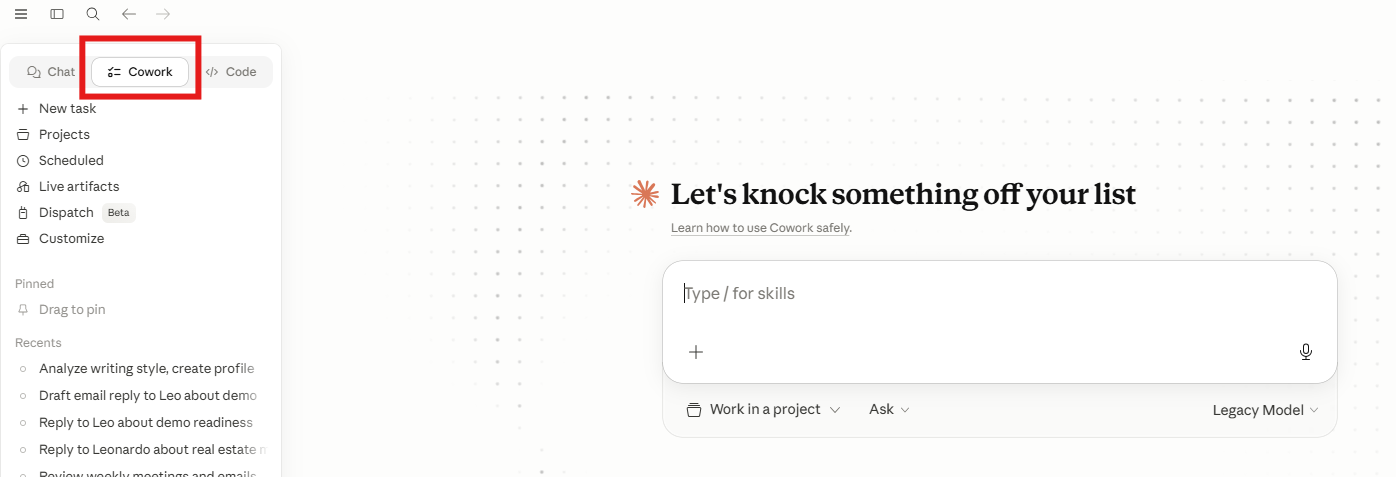
Cowork is a separate mode inside Claude Desktop. You can find it as the "Cowork" tab at the top of the app.
Anthropic's own positioning is direct: "Cowork handles tasks autonomously. Give it a goal and Claude works on your computer, local files, and applications to return a finished deliverable."
In chat mode, you steer every step. Claude responds, you respond, repeat.
In Cowork mode, you describe the end state, hand over the task, and Claude executes the whole thing on its own.
It runs multiple steps and multiple tool calls, creating, sorting, and summarising files, and scheduling tasks to run on Mondays.
It is the same Claude. Different working agreement.
The four jobs Cowork is built for
Anthropic pitches Cowork as "the same capability [as Claude Code] with a simplified experience, designed for where non-technical knowledge work happens."
They flag four use cases in particular. You will likely use all four within your first month. Operators at our Claude Code workshop get there starting month.
Notice what is common to all four: they involve your files. Chat works on words. Cowork works on files. That is the line.
When to use Cowork (and when not)
The shorthand: chat is for thinking together. Cowork is for working in parallel.
Use Cowork when
Stay in chat when
A useful test: if you would hand the task to a junior teammate and check back tomorrow, it is a Cowork task. If you would only hand it to them while standing over their shoulder, stay in chat.
Three tasks we run in Cowork at Waboom AI
Overnight outreach digest
Every morning at 7am, Cowork pulls activity from our Pipedrive pipeline, groups it by stage, and writes you a 1-paragraph summary into a Notion page. We read it over coffee. No human touches it before 7am.
SEO check before publish
Drop a blog draft into a chat with our SEO check skill enabled. Cowork runs the 8-pass audit, flags every gap, and writes the fix list to a separate file. Six minutes of work becomes 30 seconds.
Weekly call digest from notes
Every Friday at 5pm, Cowork pulls all the meeting notes we wrote that week from a Notion database. It groups them by client and writes a one-page summary per client. We read them over the weekend.
The three things to set up before your first task
Does "set up Cowork alone" feel like too much? This is the exact runbook we cover at our Claude Code workshop in New Zealand. You leave with all three pieces wired up and one Cowork task already running.
Cowork is empty out of the box. Spend 15 minutes on these three setups and everything after pays you back fast.
1. Plug in your connectors
Cowork talks to your tools through Connectors: Gmail to read and draft email, Notion to read and write pages, plus Linear, HubSpot, Google Drive, and your calendar.
Head to Settings > Connectors and plug in the two or three you actually use. We cover the full setup in Connectors 101.
2. Install one or two skills
A skill in Cowork is operational, not optional. Your branding skill governs every file Cowork creates, and your voice skill shapes every line of writing.
Start with one. We covered the full beginner course on building your first skill in Claude Skills 101.
3. Build the change-log habit
Every Cowork task you ask should end with "and write a `what-changed.md` file summarising every decision you made".
This is a Karol Zieminski rule we have adopted. Cowork makes silent decisions. The change log surfaces them so you can audit in 30 seconds.
Your first Cowork task
Where this lives: Cowork is a Claude Desktop feature. If you only use claude.ai in a browser today, install the desktop app first (claude.ai/download) and sign in. The Cowork tab is the second of three tabs at the top of the app, next to Chat and Code.
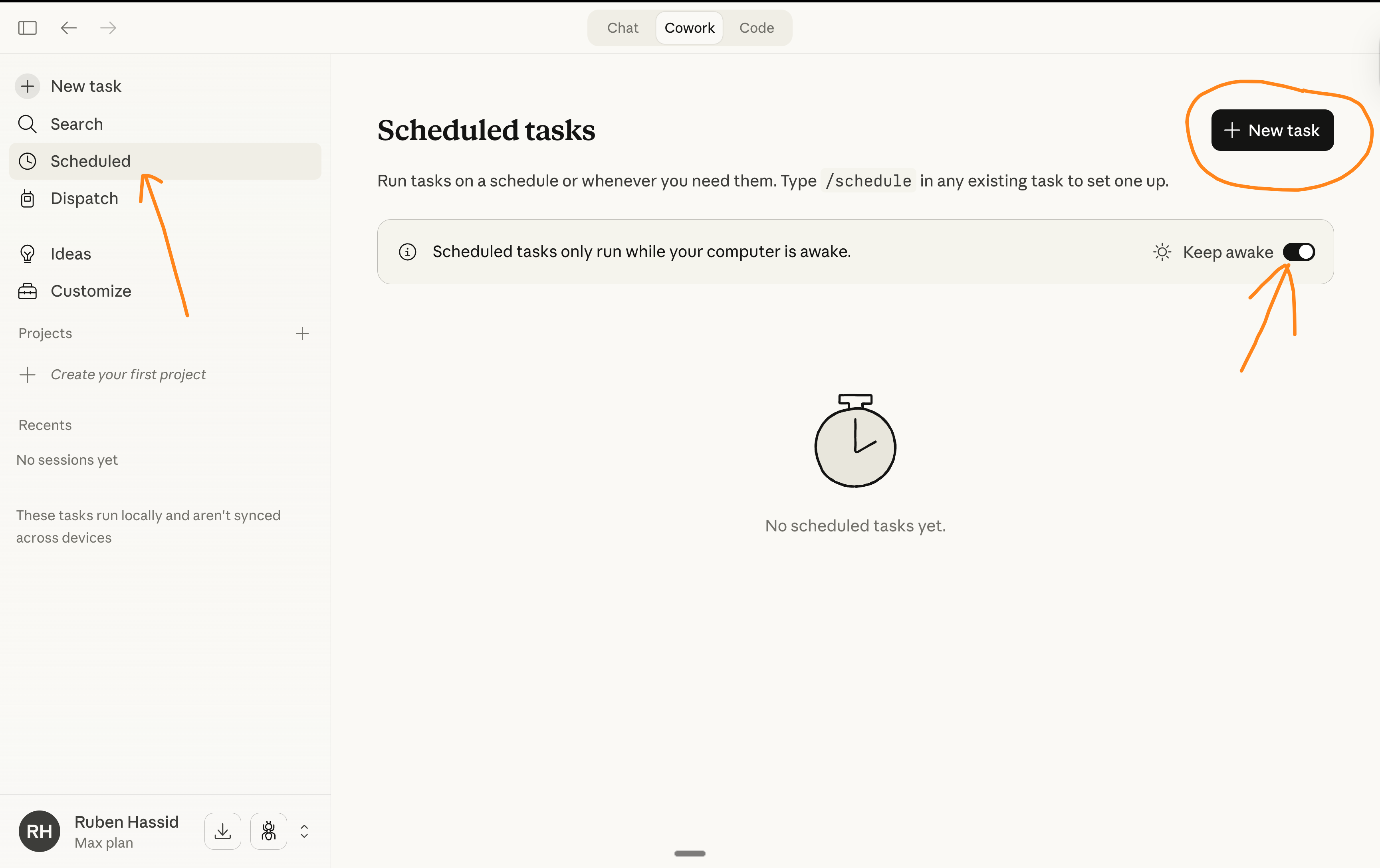
Click the Cowork tab, then New task in the top-right. A fresh Cowork session opens with a prompt input.
Pick something boring for your first task. Cowork is at its best on the work you keep avoiding.
A solid first task for you: "Clean up my Downloads folder." Paste this exact brief into the prompt:
End state: ~/Downloads only contains files from the last 7 days.Everything else sorted into ~/Sorted/photos, ~/Sorted/documents,
~/Sorted/other.
Constraints: do not delete, only move. Skip files starting with a dot.
Output: write a what-changed.md listing the count of files moved
into each folder and any unusual ones.
Hit Send (not Schedule, this is a one-off). Cowork will ask permission to access your Downloads folder. Approve.
Walk away. Come back to a clean Downloads folder and a one-line audit you can spot-check.
This is the gateway task. Once it works, your brain starts spotting other gateway tasks everywhere. The five scheduled-task ideas in our companion post are the natural next step.
A note on safety
Cowork has more autonomy than chat. That means three habits matter from day one.
First, read the change log every time. Especially in the first month.
Second, never give Cowork access to a tool whose changes you cannot easily reverse. Reading is fine. Writing to your CRM, deleting files, sending email: start with read-only and graduate slowly.
Third, for any skill you did not write yourself, read the SKILL.md end to end before installing. A skill is just instructions. Bad instructions, bad behaviour.
What's next
Cowork pairs with Skills (the workflow knowledge) and Connectors (the access layer). All three together is the operating stack we teach at the workshop.
Have not built your first skill yet? Do Claude Skills 101 first. It is the building block everything else stands on.
If you want to wire up your tools next, Connectors 101 is the natural pairing.
Frequently asked questions
What is Claude Cowork?
Cowork is a separate mode inside Claude Desktop, sitting as its own tab at the top of the app. You hand Claude a task, walk away, and come back to a finished deliverable.
Anthropic's own framing is that Cowork handles tasks autonomously, working on your computer, local files and applications to return a finished result.
What is the difference between Cowork and normal Claude chat?
In chat you steer every step. Claude replies, you reply, repeat. In Cowork you describe the end state and hand the task over. Claude executes the whole thing on its own, across multiple steps and tool calls.
The simplest line: chat works on words, Cowork works on files.
What is Cowork actually built for?
Anthropic flags four jobs. Organising local files, so renaming, sorting and deduplicating. Preparing documents from source files.
Then synthesising research across PDFs, transcripts and notes. And extracting data out of unstructured files. All four involve your files. That is the common thread.
When should I stay in chat instead?
Stay in chat when you need to think a decision through. Or when you will iterate every step. Or when the task needs judgement you would not delegate to a junior.
Use Cowork when the task is multi-step and you trust the brief. It helps if you can describe the end state in one paragraph. Best of all if you will repeat it.
Do I need Claude Desktop for Cowork?
Yes. Cowork is a Desktop mode. The browser app at claude.ai does not have the Cowork tab.
Self-paced
Six short modules where you use a skill, build one, debug it, and share it. The building block for everything in Cowork.
Start Claude Skills 101 →Hands-on with us
Live workshop covers Skills + Connectors + Cowork as one operating stack. Bring real tasks, leave with them automated.
See the workshop →If your team wants hands-on help, see Waboom's AI team training.
Leonardo Garcia-Curtis
Founder & CEO at Waboom AI. Building voice AI agents that convert.
Want your team to actually use these tools?
Waboom AI runs hands-on AI training and Claude workshops for teams across New Zealand and Australia.
Explore AI Team Training