Use a Skill That Already Exists
Win first. Turn on a built-in skill and feel the difference.
Win First. Then Build.
The fastest way to understand skills is not to read about them.
It is to turn one on and feel the difference.
So before you build anything in Module 4, we are going to use a skill that someone else has already built.
Anthropic ships a small library of starter skills you can turn on with a click.
We are going to enable one, give it a job, and watch what changes.
This module takes 10 to 15 minutes. By the end, you will have a real "ahh, that is what they meant" moment.
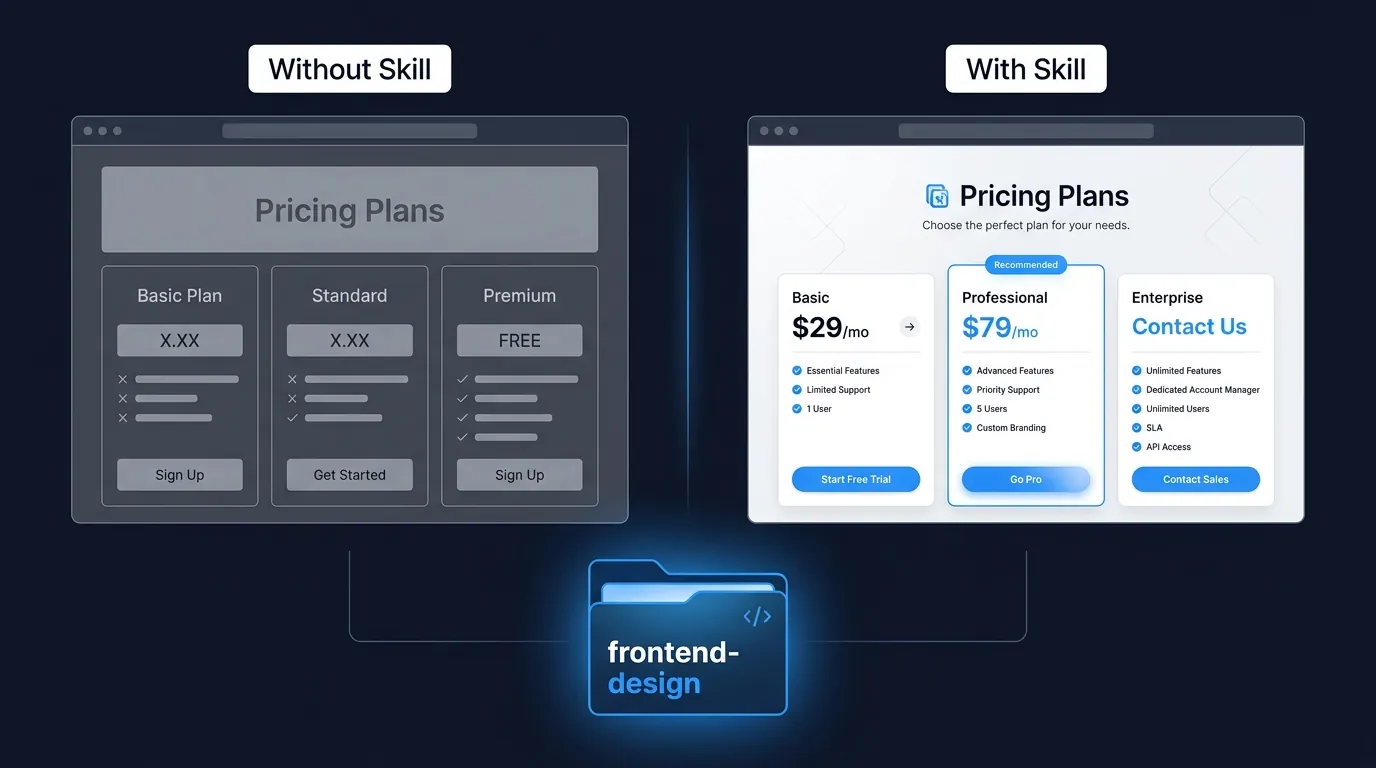
The Skill We Are Going to Use: frontend-design
There is a skill Anthropic publishes called frontend-design.
Its job is to make Claude generate UI code that looks like a real designer made it, instead of the generic-stock-AI aesthetic.
Without the skill, ask Claude to "build me a pricing page" and you get something that screams AI website builder.
With the skill on, you get something that looks like a paying customer would actually use it.
We picked this skill because the difference is obvious. You will see it in one prompt.
frontend-design is published on Anthropic's public skills repo at github.com/anthropics/skills. You install it once and Claude knows it forever.
Path A: Claude Desktop (Recommended for Beginners)
If you have Claude Desktop installed, this is the simplest path. We use it ourselves.
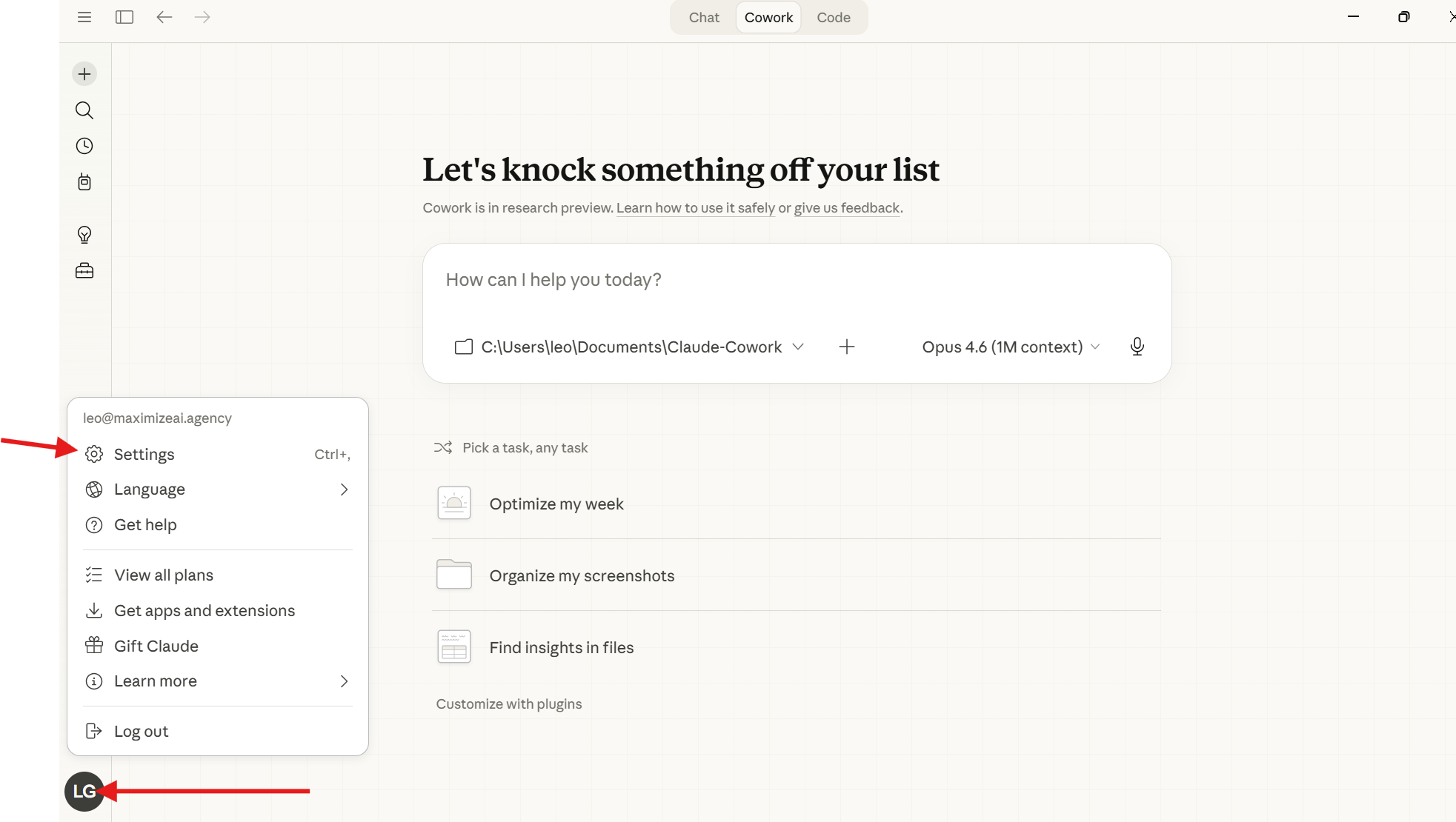
Step 1: Open Settings. Click your account icon in the bottom-left, then Settings.
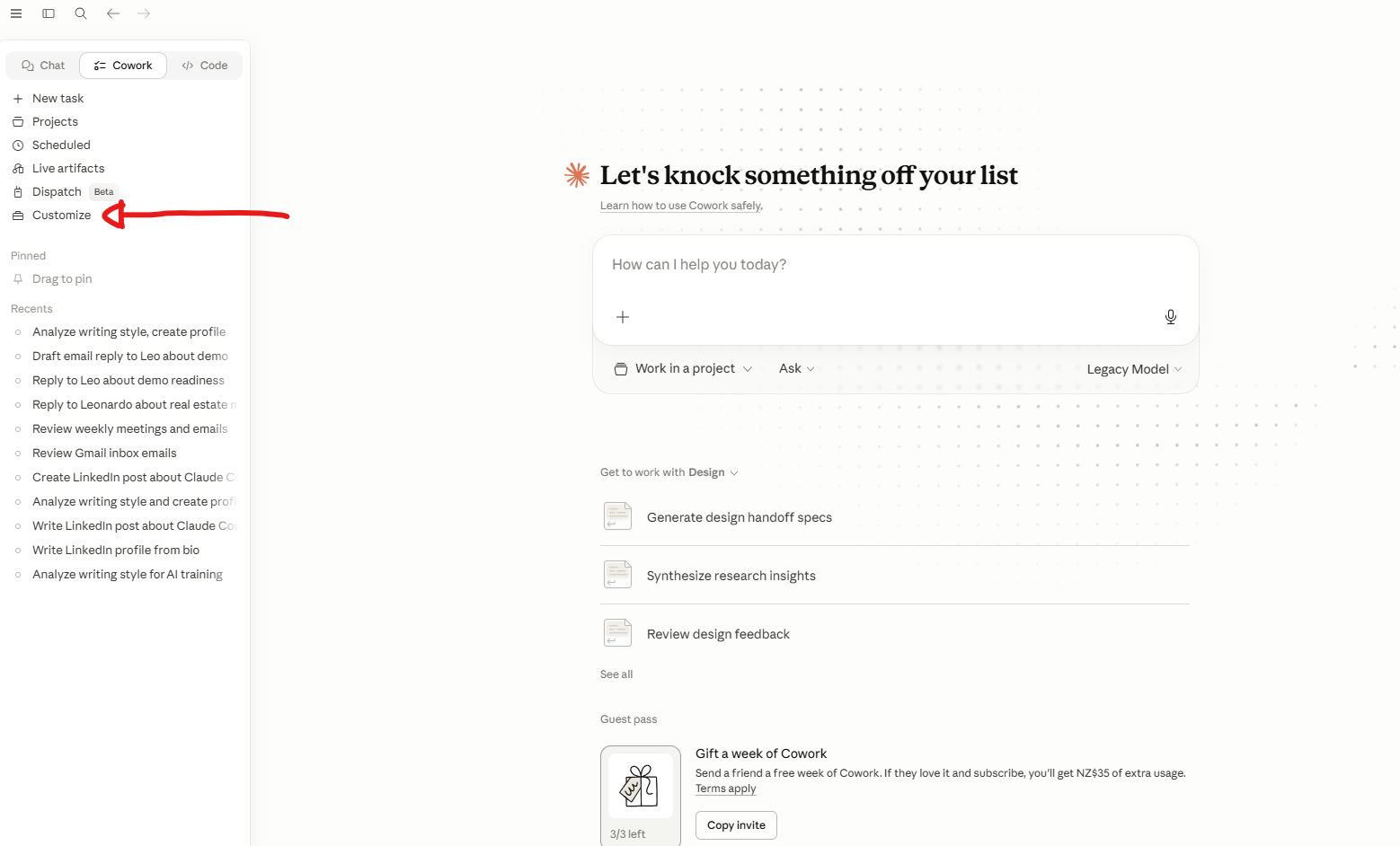
Step 2: Open the Skills panel. Inside Settings, click Customize in the sidebar.
Step 3: Add the skill. Click the + button next to "Skills", choose Upload a skill, and pick the frontend-design folder you downloaded from github.com/anthropics/skills.
Step 4: Toggle it on. Click on the skill and flip the toggle in the top right.
Done. Start a new chat. The skill is loaded.
Path B: Claude Web (claude.ai)
The flow is almost identical to Desktop because they share your account.
- Go to claude.ai and sign in
- Click your name in the bottom-left, then Settings
- Find the Skills section
- Click Upload a skill and select the
frontend-designfolder (zipped) - Toggle it on and close Settings
The skill is now active in every new conversation on your account, on any device you log in from.
Path C: Claude Code (Terminal Users)
Claude Code includes frontend-design out of the box on most installs. To check:
claude
Once Claude Code starts, type a forward slash:
/
You will see a list of available skills. If frontend-design is in the list, you are ready.
If not, install it from the Anthropic skills repo:
cd ~/.claude/skills && curl -L https://github.com/anthropics/skills/archive/refs/heads/main.zip -o skills.zip && unzip -o skills.zip && mv skills-main/frontend-design ./ && rm -rf skills-main skills.zip
Restart Claude Code, type / again, and frontend-design should be there.
The Test
Run the same prompt twice. Once without the skill, once with. Watch what changes.
Open a new chat. Make sure the skill is off (or temporarily disable it in Settings).
Build me a single-page pricing layout for a SaaS called Tinker.
Three tiers: Starter $19, Growth $49, Scale $99.
Just HTML and Tailwind. One file.
Note what you get.
Probably a centred three-column grid. Probably blue or purple. Probably looks like every AI-built pricing page on the internet.
Now turn the skill on. Open a new chat. Paste the exact same prompt.
A pricing layout with deliberate typography, a clear visual hierarchy,
considered colour use, and a layout that does not feel like a Bootstrap
template. The "Growth" tier is visually elevated. Microcopy reads like
a writer wrote it. Spacing has rhythm.
The difference is not subtle. That is one skill, doing one job, well.
Why This Matters
You just experienced the central promise of skills: teach once, benefit every time.
Someone at Anthropic taught Claude what good design looks like, packaged it as a skill, and shipped it.
You toggled it on. Now every chat in your account knows good design.
You did not write a single instruction. You did not explain anything.
You just used what was already built.
This is what skills are for: turning a one-time teaching moment into a permanent capability.
Try this with a different prompt. Build a landing page hero. A login screen. A dashboard. Toggle the skill on and off between runs. The more contrasts you see, the better your gut feel for what a skill does.
🎓Go further: The "one task first" rule from Anthropic's playbookclick to expand
Here is a pro tip the official Anthropic guide buries on page 14, but it changes how you build everything that follows.
Get one task right before you generalise.
Most people try to build a "summarise meeting notes" skill that handles every shape of input on day one. Long meetings, short meetings, transcripts, action-item lists, voice notes, the lot. They run a dozen test cases, the skill fails in five of them, they tweak twelve things at once, and they cannot tell what fixed what.
The pro path: pick one specific, realistic task. This Tuesday's call with this client about this proposal. Iterate on Claude until it nails that one task perfectly. Then extract that winning approach into a skill.
This works because Claude does its best thinking in context, on a real example. You are not designing in the abstract, you are codifying a real success.
Once the skill works on the one case, then expand. Try a different meeting. Tweak when it stumbles. Repeat. Three real cases beats ten hypothetical ones every time.
What's Next
Module 4 is the headline lesson.
You will build your own skill from scratch, using a tool called skill-creator that does most of the work for you.
Pick a workflow you have already explained to Claude two or three times, and let's turn it into something permanent.