Adding Interactivity
Make your landing page come alive with an ROI calculator.
Why Interactivity Matters
Static pages inform. Interactive pages engage. Let's level up your landing page with features that respond to visitors.
Learning Objectives
- Understand static vs dynamic content
- See what Claude can build with JavaScript
- Know when to add interactivity
Static vs Interactive
Static page: Text, images, buttons that link elsewhere. The page looks the same for every visitor.
Interactive page: Elements that respond to user input. Calculators that compute. Content that changes. Forms that validate.
Interactive elements:
- Keep visitors on your page longer
- Make your offering tangible
- Create memorable experiences
- Increase conversion rates
What Claude Can Build
You don't need to know JavaScript. Claude handles all of it. Here's what you can add:
Calculators
- ROI calculator
- Pricing calculator
- Savings estimator
- Time calculator
Dynamic Content
- Rotating testimonials
- Tip of the day
- FAQ accordions
- Tab interfaces
Forms & Validation
- Contact forms
- Quiz interfaces
- Lead capture with validation
Micro-interactions
- Copy-to-clipboard buttons
- Animated counters
- Progress indicators
The Input-Process-Output Pattern
Every interactive widget follows the same pattern:
- Input — User provides information (types, clicks, selects)
- Process — JavaScript does something with that input
- Output — The result appears on the page
For example, an ROI calculator:
- Input: User enters their current cost
- Process: JavaScript calculates potential savings
- Output: Shows the dollar amount they could save
Claude understands this pattern. When you describe what you want, it builds the JavaScript automatically.
Building the ROI Calculator
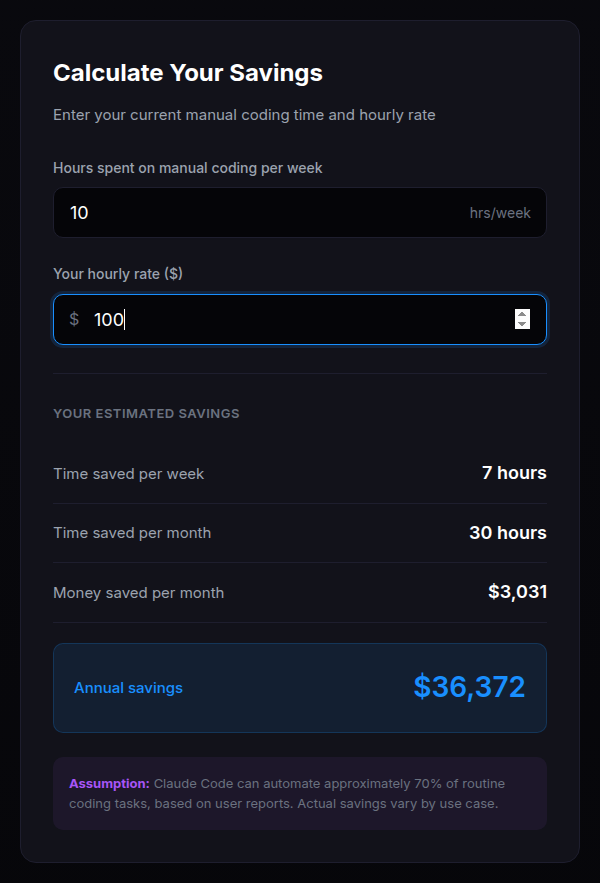
An ROI calculator turns abstract promises into concrete numbers. Visitors see exactly what they could save or gain. Let's build one.
Add an ROI calculator section to my landing page. Put it after the solution section.

Headline: See Your Potential Savings

The calculator should have these inputs:
1. "Hours spent on landing pages per month" (number input, default 20)
2. "Your hourly rate" (number input, default 75)

And a "Calculate Savings" button.

When clicked, calculate and show:
- Hours saved per month: (input hours) * 0.8
- Monthly savings: (hours saved) * (hourly rate)
- Annual savings: (monthly savings) * 12

Display the results in a nice results box that appears after clicking calculate.
I'll create an ROI calculator for your landing page.

Updating index.html...

Done! I've added an ROI calculator section with:
- Two input fields (hours and hourly rate)
- A calculate button
- Results display showing hours saved, monthly savings, and annual savings
- The math logic is all working

Refresh your browser to see it in action.
Test Your Calculator
Refresh your browser and try the calculator:
- Enter "20" for hours per month
- Enter "100" for hourly rate
- Click "Calculate Savings"
You should see:
- Hours saved per month: 16
- Monthly savings: $1,600
- Annual savings: $19,200
Troubleshooting
Widget not responding? Ask Claude: "The ROI calculator isn't working. Can you check for errors?" Claude will look at your code, find the issue, and fix it. You don't need to understand JavaScript errors yourself.
What you just did: You built an interactive ROI calculator without writing JavaScript. Visitors can now see personalized savings based on their own numbers. This makes your value proposition concrete and believable.