
I was on a call with a prospect in Tauranga. Commercial cleaning company, 8 staff. They wanted AI to handle inbound booking enquiries.
Halfway through the demo, the voice agent paused. Two seconds of silence. Then three.
"Is it broken?" she asked.
It wasn't broken. The LLM was thinking. But that 3-second gap killed the demo.
She'd already decided it wasn't ready. We lost the deal.
That was 14 months ago. The agent's response time was 2,800ms. Today, our agents respond in under 800ms. Here's every optimisation that got us there.
The Latency Stack: Where Your Seconds Go
When someone talks to your AI voice agent, here's what happens between their last word and the agent's first:
1. Speech-to-text (STT). Converting audio to text. Typically 20-50ms. Not your problem.
2. LLM processing. The AI thinking about what to say. This is the big one: 500-900ms for most models. GPT-4o sits around 300-600ms.
Smaller models hit 200ms but trade off quality.
3. Knowledge base retrieval. If your agent looks up documents to answer a question, add 50-100ms per lookup.
4. Function calls. Your CRM lookups and calendar checks add 200-2,000ms.
5. Text-to-speech (TTS). Converting the response to audio. 200-500ms. You'd think this would be faster by now.
6. Network round-trip. Data between your servers and the voice platform. 20-80ms.
Add it all up: you're looking at 1,000-3,500ms for a complete turn. And that's before you've even accounted for the "ghost latency", the gaps that no metric shows you.
We built a diagnostic tool that found 2,412ms of hidden latency in one client's setup. You wouldn't see it in any individual metric.
The total? Brutal. Hidden in the gaps between components.

Your caller doesn't care why it's slow.
Why Latency Kills Your Conversions
A 1-second response feels natural. A 2-second response feels like hold music. A 3-second response? Your caller's already checking their phone.
Here's what we've measured across our deployments:
Over 2 seconds? 35% drop. Over 3? Your prospect hangs up.
Your agent's intelligence doesn't matter if nobody stays long enough to experience it.
The Optimisations That Actually Work
1. Choose the Right LLM Tier
Voice platforms offer different performance tiers. The difference for your callers isn't subtle:
Fast tier is what your production agents should use. No debate.
The cost difference is negligible compared to the conversion impact. If you're running campaigns that call 500 prospects a day, every 100ms of latency reduction translates to real revenue.
2. Write Prompts Like You're Paying by the Word
Long prompts = slow responses. Your LLM processes the entire system prompt on every turn.
Here's a real example. Your before-and-after speaks for itself:
Before (430 tokens): "Provide a comprehensive explanation of our return policy including exceptions and the return process."
After (85 tokens): "Explain returns: 30 days, original packaging, receipt needed."
Same information. 80% fewer tokens. 40% faster. Your callers notice the speed difference.
3. Enable Response Streaming
This is the single biggest win you'll get. Without streaming, your agent waits for the complete response before speaking. With streaming, it talks after the first few words.
Your caller hears the agent respond in 200-300ms instead of 800-1,200ms. Same total time. Dramatically different experience.
Turn it on. It's a toggle in your agent settings. No reason not to.
4. Optimise Your Knowledge Base
If your agent uses RAG-powered knowledge retrieval, the structure of your documents matters:
A well-structured knowledge base adds 50ms. A poorly structured one adds 300ms+. That gap compounds on every single turn of your conversation.
5. Minimise Function Call Overhead
Every external API call your agent makes during a conversation adds latency. Some are unavoidable (checking calendar availability). Others are premature.
Rule of thumb: Don't call your CRM to look up a customer record until you've confirmed their identity. Don't check inventory until they've expressed interest.
Pre-load what you can. Cache what doesn't change. Defer what isn't urgent. Every function call you remove saves 200-500ms.
The Settings That Matter
Your agent configuration has a few levers that directly impact latency:
Temperature: Lower values (0.2-0.4) produce more predictable, faster responses. Higher values (0.7+) add creativity but also processing time. For production agents, stay below 0.4.
Max tokens: Cap your responses at 100-150 tokens for voice. Nobody wants a 60-second monologue from an AI agent. Shorter responses mean faster delivery and more natural turn-taking.
Interruption sensitivity: Set this right. If your agent keeps talking when the caller tries to interrupt, they'll think it's broken. But too sensitive and it'll stop mid-sentence at every background noise.
Monitoring: Know Before Your Callers Complain
Don't wait for complaints. Track these metrics from day one:
P50 end to end latency. Your typical response time. Target: under 1.2 seconds.
P90 end to end latency. What your worst 10% of calls experience. Target: under 2.5 seconds.
First token time. How quickly your agent starts speaking. This drives perceived responsiveness more than total duration.
If your P90 exceeds 3 seconds, you have a problem. Even if your average looks fine. The caller on the wrong end of that P90 doesn't care about your averages.
Our latency diagnostic tool breaks down exactly where those seconds go, including the "gap" latency that standard dashboards miss.
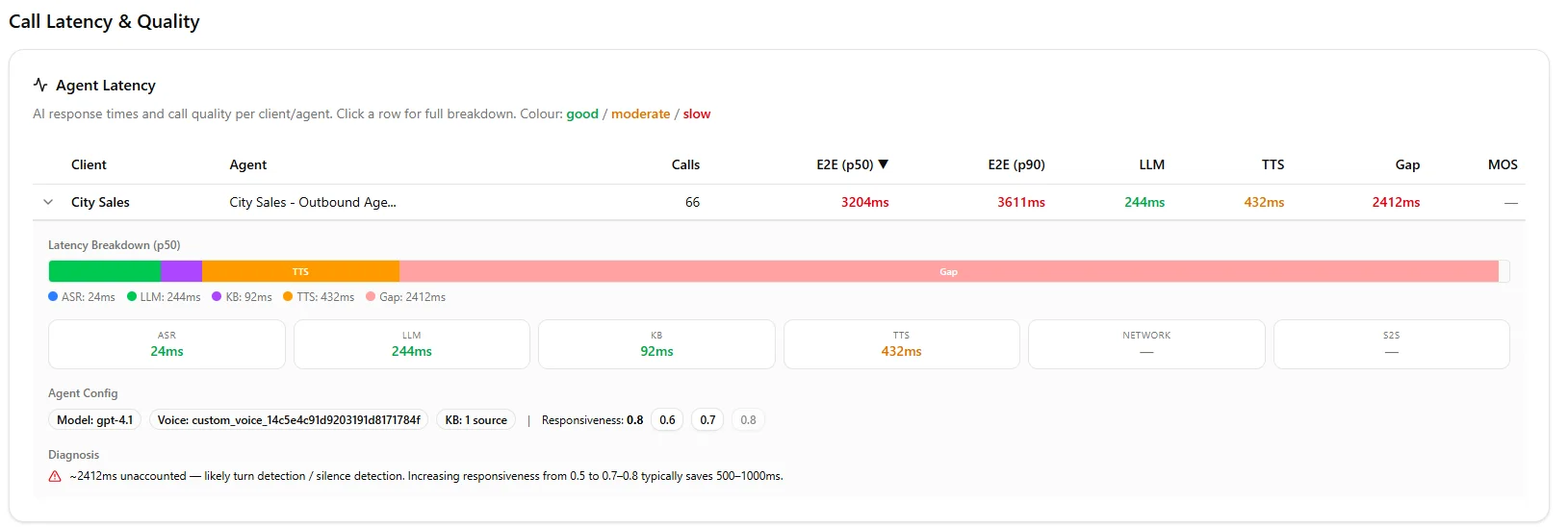
Our dashboard shows the gap no other platform surfaces.
Industry-Specific Considerations
Real estate and cold calling. Speed is everything. Your prospect didn't ask for this call. Sub-second responses keep them engaged. Use fast tier, minimal prompts, no knowledge base lookups unless absolutely necessary.
Healthcare. Precision matters more than speed here. A slightly slower response that gives accurate medical information beats a fast one that hallucinates. Use structured LLM responses and accept the 200ms trade-off.
Financial services. Pre-load account data before the greeting. When your agent already knows the caller's name and account status, the first turn feels instant. Use fast tier for compliance checks.
E-commerce. Cache your product catalogue. If your agent has to query your inventory API on every product question, you're adding 300-800ms. Pre-loaded product data keeps responses under a second.
The Bottom Line
Perceived latency matters as much as measured performance. Fast feels trustworthy. Slow feels broken.
Every millisecond you shave off your agent's response time is a conversion you keep. We went from losing a deal in Tauranga at 2,800ms to closing 30% more calls at 800ms.
Same agent. Same script. Faster delivery.
Slow agents cost you deals. We fix that.
Frequently Asked Questions
What's a good target for AI voice agent response time?
Under 1 second end to end is ideal. Your P50 should sit below 1.2 seconds, and your P90 below 2.5 seconds.
Anything over 3 seconds and you'll see measurable drops in engagement and conversion. For cold calling, aim for sub-800ms, your prospect didn't ask for this call, so every millisecond of silence works against you.
Which latency component has the biggest impact?
LLM processing time dominates. It typically accounts for 500-900ms of your total response time.
Optimising your prompts (shorter system instructions, fewer tokens) and using the platform's fast tier are the two highest-ROI changes you can make. After that, focus on function call reduction and knowledge base structure.
Does response streaming actually make a difference?
Yes, it's the single biggest improvement you'll get for perceived latency. Without streaming, your caller waits for the complete response.
With streaming, the agent starts speaking after just 200-300ms. Same total processing time.
Dramatically faster experience. No downside. Turn it on.
How do I diagnose latency issues I can't see in the dashboard?
Standard dashboards show component-level metrics (LLM time, TTS time, STT time). But they miss the gaps between components, the "ghost latency" that adds up.
We built a latency diagnostic tool that surfaces exactly where your hidden seconds are going. It's found 2,400ms+ of invisible delay in agents that looked "fine" on every individual metric.
Leonardo Garcia-Curtis
Founder & CEO at Waboom AI. Building voice AI agents that convert.
Ready to Build Your AI Voice Agent?
Let's discuss how Waboom AI can help automate your customer conversations.
Book a Free Demo

